Start With Props and Render
A component that only shows what it is given needs no hooks at all. They come in when a component has to remember something, respond to the user, or talk to the world outside React.
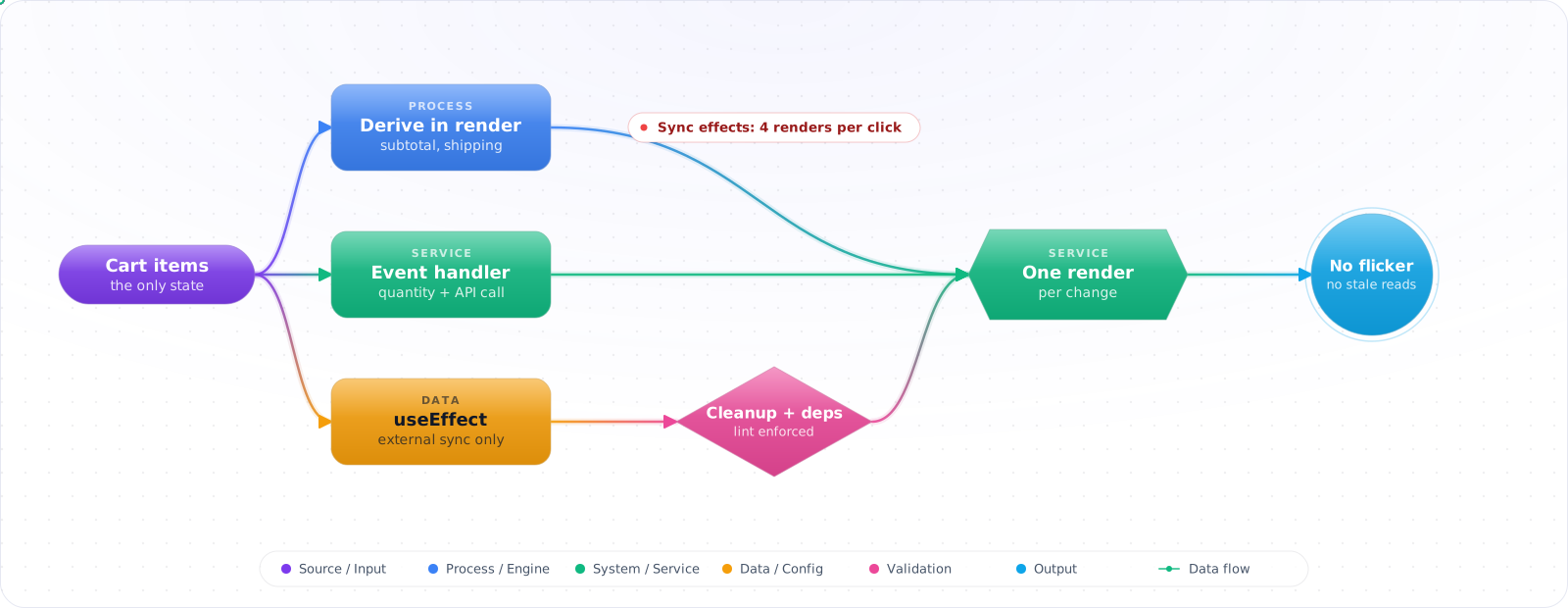
Take a typical case, made up for illustration. A cart drawer had five effects. Changing an item's quantity updated the items, then one effect set the subtotal, another set the shipping message, another the progress bar. Four renders per click, with the old total flickering in between. A fifth effect ran a timer that always read the cart count from the first render.
Hooks are simple to call and easy to misuse, and nearly all the trouble comes from useEffect doing work that belongs elsewhere. Below is the mental model for hooks in React 19: derive values during render, act in event handlers, use effects only to sync with the outside world, plus the newer hooks for actions and optimistic updates.
- You wrap every callback in
useCallback"just in case" - Your
useEffectdependency array has 8 items and you can't remember why - You added
useMemoaround a value and didn't measure whether it actually helped - You're still using
forwardRefin new React 19 components - You reach for
useEffectto sync derived state instead of computing it during render
How Hooks Actually Work
A hook is a function that lets a function component "hook into" React features — state, lifecycle, refs, context. The rules are non-negotiable: hooks run in the same order on every render, so you call them at the top level (never inside conditions or loops) and only from React function components or other hooks. The order is how React matches a hook call to its slot in the fiber.
flowchart TB
    A["Function Component renders"] --> B["Hook calls (in order)"]
    B --> C["useState — local state"]
    B --> D["useReducer — complex state"]
    B --> E["useRef — mutable box"]
    B --> F["useEffect — sync with external"]
    B --> G["useMemo / useCallback — perf escape hatch"]
    B --> H["use() — read promise/context"]
    B --> I["useActionState — form state"]
    B --> J["useOptimistic — pending UI"]

    style A fill:#4f46e5,color:#fff,stroke:#4338ca
    style H fill:#059669,color:#fff,stroke:#047857
    style I fill:#059669,color:#fff,stroke:#047857
    style J fill:#059669,color:#fff,stroke:#047857
The 2026 shift: with the React Compiler stable and enabled in your build, manual useMemo/useCallback/React.memo are largely unnecessary in new code — the compiler memoizes automatically based on data flow. New code no longer needs forwardRef, which still works for now, because ref is a normal prop on function components. use() can read promises (suspends) or context (works conditionally). Server Actions changed how forms work via useActionState and useFormStatus.
Hooks in Real Components
Step 1: useState — initialize lazy, update functional
// BAD — runs the heavy compute on every render
const [tree] = useState(buildHugeTree(props.input));

// GOOD — pass an initializer fn, runs once
const [tree] = useState(() => buildHugeTree(props.input));

// BAD — stale closure when updating from async/event
const [count, setCount] = useState(0);
const onClick = () => setCount(count + 1); // captured at render

// GOOD — functional updater always sees latest
const onClick = () => setCount(c => c + 1);
Step 2: useEffect — sync, don't orchestrate
Effects exist to synchronize the component with something outside React (DOM events, subscriptions, network). They are nota place to derive state, run on user actions, or chain effects.
// BAD — using useEffect to derive state from props
function Cart({ items }: { items: Item[] }) {
  const [total, setTotal] = useState(0);
  useEffect(() => {
    setTotal(items.reduce((sum, i) => sum + i.price, 0));
  }, [items]); // extra render + flicker

  return <div>{total}</div>;
}

// GOOD — compute during render
function Cart({ items }: { items: Item[] }) {
  const total = items.reduce((sum, i) => sum + i.price, 0);
  return <div>{total}</div>;
}

// GOOD — useEffect for actual external sync
function ChatRoom({ roomId }: { roomId: string }) {
  useEffect(() => {
    const conn = createConnection(roomId);
    conn.connect();
    return () => conn.disconnect(); // cleanup is mandatory
  }, [roomId]);
}
Step 3: useRef — mutable box that survives renders
// DOM ref — passed via the ref prop (no forwardRef in React 19)
function TextInput({ ref }: { ref: React.Ref<HTMLInputElement> }) {
  return <input ref={ref} />;
}

// Mutable instance value — does NOT trigger re-render
function Stopwatch() {
  const intervalId = useRef<number | null>(null);
  const startedAt = useRef<number>(0);

  const start = () => {
    startedAt.current = Date.now();
    intervalId.current = window.setInterval(tick, 100);
  };
  // ...
}
Step 4: use() — the React 19 universal reader
import { use, Suspense } from 'react';

// 1) Read a promise — suspends until resolved
function Comments({ commentsPromise }: { commentsPromise: Promise<Comment[]> }) {
  const comments = use(commentsPromise);
  return <ul>{comments.map(c => <li key={c.id}>{c.text}</li>)}</ul>;
}

// Parent passes the promise WITHOUT awaiting — child suspends
function Page() {
  const promise = fetchComments();
  return (
    <Suspense fallback={<p>Loading…</p>}>
      <Comments commentsPromise={promise} />
    </Suspense>
  );
}

// 2) Read context — unlike useContext, can be called conditionally
function Header() {
  if (someCondition) return null;
  const theme = use(ThemeContext); // legal, useContext would not be
  return <header className={theme}>…</header>;
}
Step 5: useActionState + useFormStatus for forms
'use client';
import { useActionState } from 'react';
import { useFormStatus } from 'react-dom';

async function signup(prevState: State, formData: FormData) {
  const email = formData.get('email') as string;
  const res = await fetch('/api/signup', { method: 'POST', body: formData });
  return res.ok ? { ok: true } : { ok: false, error: 'Email already used' };
}

export function SignupForm() {
  const [state, formAction, isPending] = useActionState(signup, { ok: false });
  return (
    <form action={formAction}>
      <input name="email" type="email" required />
      <SubmitButton />
      {state.error && <p role="alert">{state.error}</p>}
    </form>
  );
}

function SubmitButton() {
  const { pending } = useFormStatus(); // status of nearest parent form
  return <button disabled={pending}>{pending ? 'Sending…' : 'Sign up'}</button>;
}
Step 6: Custom hooks — extract behavior, not lines
// Extract when behavior is reused OR when naming improves the call site
function subscribe(onChange: () => void) {
  window.addEventListener('online', onChange);
  window.addEventListener('offline', onChange);
  return () => {
    window.removeEventListener('online', onChange);
    window.removeEventListener('offline', onChange);
  };
}

function useOnlineStatus() {
  // The third argument is the snapshot for SSR, where navigator doesn't exist
  return useSyncExternalStore(subscribe, () => navigator.onLine, () => true);
}

// Usage — call site reads like English
function StatusBar() {
  const isOnline = useOnlineStatus();
  return <span>{isOnline ? '✓ Online' : '⚠ Offline'}</span>;
}
How Hook Code Goes Wrong
1. Over-memoizing. Wrapping every value in useMemo and every callback in useCallback adds bookkeeping cost and makes code harder to read. With the React Compiler enabled it's usually redundant, because the compiler handles it. Profile before reaching for these, and before you remove one, check that nothing relies on that value keeping a stable identity.
2. Missing dependencies. Lying to the dependency array (// eslint-disable-next-line) creates stale-closure bugs that only show up under specific timing. If a value isn't safe to depend on, lift it into a ref or restructure.
3. useEffect for everything. The most common React anti-pattern: using effects to derive state, fetch data on the client when a Server Component would, transform props, or run on user clicks. The official guide You Might Not Need an Effect still applies.
4. useState for non-rendering values. If a value never appears in JSX, it doesn't belong in state — useuseRef. Setting state you never read causes wasted re-renders.
5. Using forwardRef in new code. React 19 removed the need entirely — ref is a normal prop. Codemods exist for the migration. Keep forwardRef only in libraries that still target React 18.
Check it: Count the renders for one interaction in the Profiler. More than one usually means an effect is setting state that could have been derived.
Rules I Follow
- Default to deriving values during render. Reach for
useEffectonly when you need to sync with something outside React. - Use the functional updater form of setters whenever the new value depends on the old one.
- With the React Compiler enabled, delete most
useMemo/useCallback/React.memoin new code. - Prefer
use(promise)+<Suspense>overuseEffect+useStatefor data fetching in Client Components that receive a promise from a Server Component. - For forms,
useActionState+useFormStatushandle most cases without a state library. - Drop
forwardRef— passrefas a prop in React 19. - Keep custom hooks small and named after the behavior (
useOnlineStatus), not the implementation (useEventListenerForOnlineEvents).
Try It on Your Own System This Week
Three checks on a component full of hooks, about an hour in total:
- For each effect, ask what outside React it keeps in step. If the answer is nothing, it should be a derived value or a handler.
- Search for setters that use the current value directly. Use the functional form when the new value depends on the old one.
- Run the component in Strict Mode. An effect that breaks when it runs twice has no proper cleanup.
useEffect After the React Compiler
The React Compiler reached 1.0 in late 2025, and it changes which hooks you should reach for. It memoises components, hooks and values at build time, so most manual useMemo, useCallback and React.memo calls become unnecessary. New code can skip them unless a profile says otherwise. Old code can keep them, since they do no harm. The compiler relies on your code following the Rules of React, so turn on eslint-plugin-react-hooks and fix what it reports. Code that mutates props or breaks hook rules will simply be skipped.
Hooks added in React 19
Several newer hooks replace patterns you may be writing by hand:
usereads a promise or a context, and unlike other hooks it can be called inside a condition.useActionStatemanages the result and pending state of a form action.useOptimisticshows an expected result immediately, and rolls back if the action fails.useFormStatuslets a child, such as a submit button, read its parent form's pending state.useEffectEvent, stable in React 19.2, lets an effect read the latest props without re-running when they change.
That last one fixes a very old annoyance. Previously, you either added a value to the dependency array and re-ran the effect, or suppressed the lint rule and risked a stale value:
function ChatRoom({ roomId, theme }: { roomId: string; theme: string }) {
  const onConnected = useEffectEvent(() => showToast('Connected', theme));

  useEffect(() => {
    const connection = connect(roomId);
    connection.on('connected', onConnected);
    return () => connection.disconnect();
  }, [roomId]);
}
Effects in Strict Mode
In development, Strict Mode mounts each component twice, to expose effects with no proper cleanup. If that double run breaks your feature, the bug is real. It will show up in production as well, during fast navigation, or when a component remounts. Always return a cleanup, and cancel in-flight requests with AbortController, otherwise a slow response can overwrite a newer one.
A short test for every effect
Before you write useEffect, ask if you're syncing with something outside React. If you're deriving a value, compute it during render. If you're responding to a click, do it in the handler. If you're fetching, use a data library or a Server Component. What's left, such as subscriptions, timers and browser APIs, is what effects are actually for. Coding agents love to write unnecessary effects, so check this in review, too.