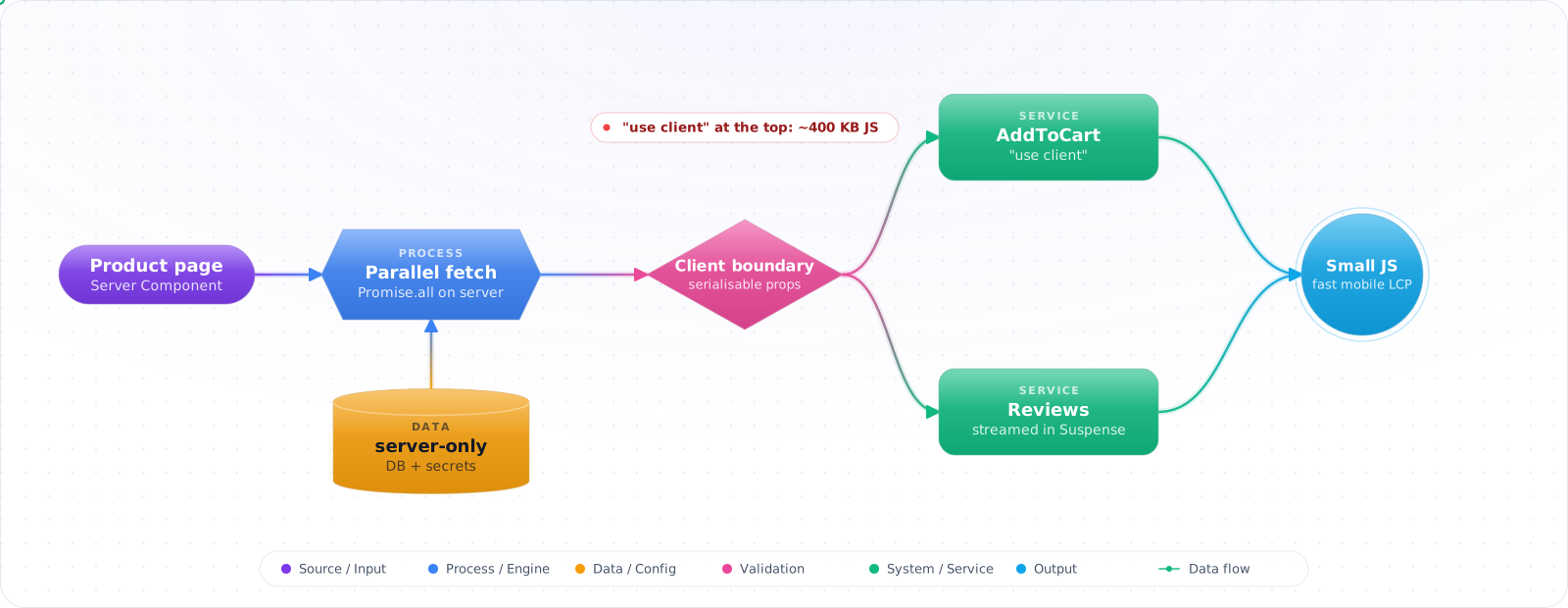
Start With Everything on the Server
A page with nothing to click needs no client components at all. Leave everything on the server. The boundary only has to be drawn when part of the page becomes interactive.
Take a typical case, made up for illustration. A product page had "use client" at the top so that hooks would work anywhere. As a result, the markdown renderer, the date library and every review component shipped to the browser, about 400 KB of JavaScript for a page that was mostly text and images. Data loaded in effects after hydration, one request after another.
Server Components flip the default: components run on the server and send HTML and data, not code. Only the parts you mark as client components ship JavaScript. Below is what runs where, what can cross the boundary, how to fetch data on the server without waterfalls, and how to keep server-only code out of the browser for good.
- You add
'use client'to every file out of habit and ship 200KB of JS for a static page - You wrote a
useEffect+useStatedance to fetch data the server already had - You confused Server Components with SSR (Server-Side Rendering) and can't explain the difference
- You tried to import a Server Component into a Client Component and got a cryptic error
- Outcome: Place the client boundary deliberately and implement a mutation without treating the UI as a security boundary.
- Environment: React 19 and Next.js 16 App Router, with async route parameters and Server Actions.
- Code status: The TSX blocks are partial snippets assuming a database schema, authenticated-user helper, rate limiter, sanitizer, and unique like constraint.
- Scope: Covers composition, data loading, mutation, caching, and trust boundaries—not a complete Prisma schema, session system, CSP, or deployment setup.
What Runs Where
Two component types, two runtimes:
- Server Component — runs only on the server, at build time for static routes or per request for dynamic ones. Can be async, can
awaita database query, can read environment secrets. Renders to the RSC Payload (a compact serialized tree) plus HTML for the initial response. Ships zero JS. - Client Component — opted in with
'use client'. Renders on the server (for HTML) AND ships its JS to the browser for hydration and subsequent renders. Anything interactive (state, effects, browser APIs, event handlers) must live here.
flowchart TB
    A["Request hits Next.js"] --> B["Run Server Components<br/>(async, hits DB directly)"]
    B --> C["Generate RSC Payload<br/>+ initial HTML"]
    C --> D["Stream to browser"]
    D --> E["Browser shows HTML instantly"]
    E --> F["Hydrate Client Components<br/>(only the islands marked 'use client')"]
    F --> G["RSC Payload reconciles<br/>Client + Server trees"]

    style B fill:#059669,color:#fff,stroke:#047857
    style F fill:#0891b2,color:#fff,stroke:#0e7490
    style C fill:#4f46e5,color:#fff,stroke:#4338ca
The directive boundary
'use client' at the top of a file marks a boundary, not just that file. Every module imported (transitively) from a client file becomes part of the client bundle. So you put 'use client' at the lowest leaf possible — usually the small interactive widget, never the page.
'use server' at the top of a file or function marks a Server Action — a function the client can invoke that runs on the server. It is not what makes a component a Server Component (Server Components are the default).
Building Server-First Pages
Step 1: A typical Next.js 16 page — async Server Component
// app/posts/[slug]/page.tsx — a Server Component (default)
import { db } from '@/lib/db';
import sanitizeHtml from 'sanitize-html';
import { LikeButton } from './like-button';

export default async function PostPage({
  params,
}: {
  params: Promise<{ slug: string }>; // Next 16: params is a Promise
}) {
  const { slug } = await params;
  const post = await db.post.findUnique({ where: { slug } });
  if (!post) return <p>Not found</p>;

  return (
    <article>
      <h1>{post.title}</h1>
      {/* post.html is untrusted editorial input, so sanitize it before rendering */}
      <div dangerouslySetInnerHTML={{ __html: sanitizeHtml(post.html) }} />
      {/* Hand off the count to a Client Component for interactivity */}
      <LikeButton postId={post.id} initialLikes={post.likes} />
    </article>
  );
}Check it: Search for effects that fetch data on first render. Each one is a candidate for an async Server Component.
Step 2: Client Component — small, leaf-level
// app/posts/[slug]/like-button.tsx
'use client';
import { useOptimistic, useTransition } from 'react';
import { likePost } from './actions';

export function LikeButton({
  postId,
  initialLikes,
}: { postId: string; initialLikes: number }) {
  const [optimistic, addOptimistic] = useOptimistic(
    initialLikes,
    (current: number, delta: number) => current + delta,
  );
  const [pending, startTransition] = useTransition();

  return (
    <button
      disabled={pending}
      onClick={() =>
        startTransition(async () => {
          addOptimistic(1);
          await likePost(postId); // Server Action
        })
      }
    >
      ♥ {optimistic}
    </button>
  );
}Check it: Build the app and look at the JavaScript shipped for one content page. Then find the highest file marked as a client component, and ask whether it needs to be.
Step 3: Server Action — the mutation path
// app/posts/[slug]/actions.ts
'use server';
import { db } from '@/lib/db';
import { revalidatePath } from 'next/cache';
import { z } from 'zod';
import { requireUser } from '@/lib/auth';
import { likeRateLimit } from '@/lib/rate-limit';

// Policy: any signed-in user may like a post once. Direct action requests must pass
// the same validation, authentication and abuse controls as clicks from the UI.
export async function likePost(postId: string) {
  const user = await requireUser();
  const validPostId = z.string().uuid().parse(postId);
  await likeRateLimit.check(user.id);

  const post = await db.$transaction(async tx => {
    await tx.postLike.upsert({
      where: { postId_userId: { postId: validPostId, userId: user.id } },
      create: { postId: validPostId, userId: user.id },
      update: {}, // duplicate requests are idempotent
    });
    return tx.post.findUniqueOrThrow({
      where: { id: validPostId },
      select: { slug: true },
    });
  });
  revalidatePath(`/posts/${post.slug}`); // the page is routed by slug, not id
}Check it: Call the action directly as a signed-out user, and then as a user who doesn't own the record. Both should be refused.
Step 4: Composition — passing Server Components as children
A Client Component cannot import a Server Component (the import would pull server-only code into the client bundle). But it can render one passed via children or any prop slot.
// Client wrapper that adds a collapsible UI
'use client';
import { useState } from 'react';

export function Collapsible({ children }: { children: React.ReactNode }) {
  const [open, setOpen] = useState(false);
  return (
    <div>
      <button onClick={() => setOpen(o => !o)}>{open ? 'Hide' : 'Show'}</button>
      {open && children}
    </div>
  );
}

// Server Component composes them — Comments runs on the server
export default async function Page() {
  return (
    <Collapsible>
      <Comments /> {/* Server Component, async, hits DB */}
    </Collapsible>
  );
}
Step 5: Stream slow data with <Suspense>
import { Suspense } from 'react';

export default function Page() {
  return (
    <>
      <h1>Dashboard</h1>
      <FastWidget />
      <Suspense fallback={<Skeleton />}>
        <SlowWidget /> {/* awaits a slow API; HTML streams when ready */}
      </Suspense>
    </>
  );
}

async function SlowWidget() {
  const data = await fetch('https://slow.example.com/data').then(r => r.json());
  return <pre>{JSON.stringify(data, null, 2)}</pre>;
}
How the Boundary Gets Crossed Wrongly
1. Adding 'use client' at the page level. Now everything below it is a Client Component. You lose direct DB access, your bundle balloons, and you re-introduce the loading-spinner waterfall. Push the boundary down to the leaf widget.
2. Importing a Server Component into a Client Component. Doesn't work — the import graph would leak server code. Pass the Server Component as a child or prop instead.
3. Forgetting params is a Promise (Next 16). TypeScript rejects const { slug } = params, and in plain JavaScript slug is undefined. Always await params. Same for searchParams.
4. Using useState/useEffect in a Server Component. The error is loud: hooks aren't available there. If you reach for state, that subtree should be a Client Component.
5. Treating Server Actions as RPC for everything. Server Actions are perfect for mutations triggered by user UI. For pure data reads from a Client Component, prefer fetching in the parent Server Component and passing data as a prop, or use a Route Handler with React Query.
6. Confusing RSC with SSR. SSR renders Client Components to HTML on the server once, then ships the JS to re-render them in the browser. RSC components only ever run on the server and ship zero JS for themselves. Your app uses both at once.
Rules I Follow
- Server Components are the default in Next.js 16 App Router. Add
'use client'only where you need state, effects, or browser APIs. - Push the client boundary as far down the tree as possible — usually a small leaf widget.
- Client Components can't import Server Components, but can compose them via
children. - Use Server Actions (
'use server') for mutations; pair withuseOptimistic+useTransitionfor snappy UX. - Wrap slow data in
<Suspense>— Next.js streams HTML as Server Components resolve. - Read environment secrets (DB URLs, API keys) only in Server Components or Server Actions — never in Client Components.
- Remember Next 16:
params,searchParams,cookies(), andheaders()are now async.
Security and the Server Boundary
Server Components feel like ordinary components, which makes them easy to treat casually. They run on your server, with access to your database and secrets, and that's a real security boundary.
The Flight protocol that connects server and client was the site of a critical flaw in December 2025, CVE-2025-55182, which allowed remote code execution. So keep React and your framework patched. Treat this as you would any internet-facing server, because that's what it is.
Be careful about what crosses to the client. Any prop you pass to a Client Component ends up in the page payload, visible to anyone. Passing a full user record, with fields such as password hashes or internal notes, leaks them, even if you never render them. Pass only what the component needs. Use a data access layer that returns safe objects, and import server-only in modules that must never reach the browser, so that a mistake fails the build.
Streaming for LLM output
Server Components and Suspense work well for AI features. A page can stream its shell at once, and then fill in a slow model response when it's ready. For token-by-token output, you still need a client component reading a stream, or a helper like the AI SDK's. Keep the API key on the server, and handle abandoned requests, so that you stop paying for tokens nobody will read.
Check it: View the page source and search for a field the user should never see. Anything passed to a Client Component is in there.
Try It on Your Own System This Week
Three checks on a Next.js app, about an hour in total:
- Count the files that start with the client directive. For each one, name the interaction that needs it.
- Search Client Components for environment secrets. They belong in Server Components and Server Actions only.
- Compare your React and framework versions with the latest patches. The server boundary faces the internet.
Completion Check
- The client bundle contains only the interactive leaf components and their required dependencies.
- Only explicitly safe fields cross from Server Components to Client Components.
- Server Actions validate input, authenticate the caller, enforce the declared resource policy, limit abuse, and define duplicate-request behaviour.
- Untrusted HTML is sanitized with an allowlist and tested using malicious markup.
- A mutation test proves the actual slug route refreshes, while direct unauthorized requests are rejected.