


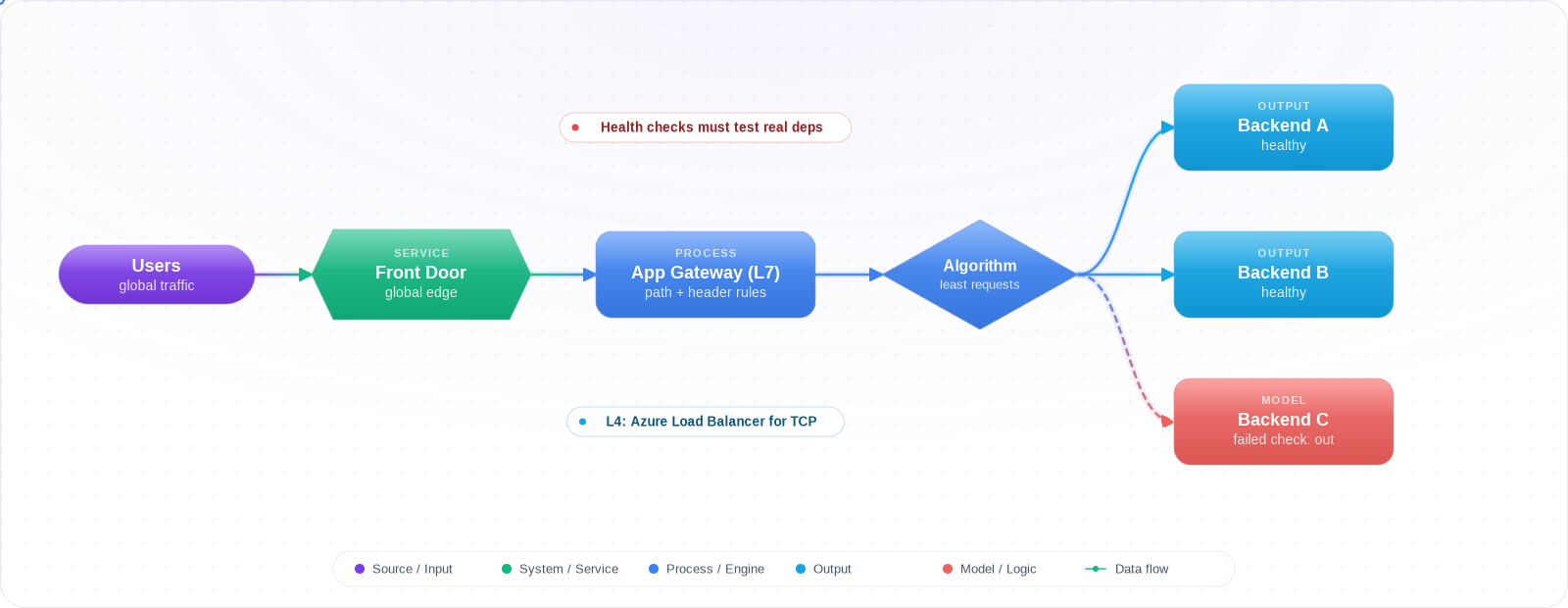
Spreading Load So No Server Drowns
A single server can't serve a popular product. The cure is N servers behind a load balancer that distributes requests so no single machine drowns. The mechanics get interesting fast: which algorithm? Layer 4 or layer 7? How do you handle sticky sessions, slow backends, sudden failures, blue/green deploys, and TLS termination?
Modern load balancers do far more than "round-robin" — health checks, outlier ejection, weighted traffic, header-based routing, request hedging, retry budgets, and circuit breaking can all live in a modern proxy or load balancer. Below are the layer choices, the algorithms, and the operational behaviour that decides whether one bad backend takes your service down.
- You picked round-robin and one backend with a slow GC took the fleet down via timeouts
- You can't explain when to use Azure Front Door vs Application Gateway vs Load Balancer
- Your sticky sessions broke a rolling deploy
- You don't have outlier ejection and a half-dead instance is still in rotation
This is the load-balancer mental model — L4 vs L7, the algorithms that matter, health checks that work, and the Azure service that fits each tier.
Algorithms, Layers and Health Checks
Two layers, very different jobs:
- L4 (TCP/UDP) — Azure Load Balancer, AWS NLB. Routes packets by 5-tuple (src ip, src port, dst ip, dst port, protocol). Less processing than L7 and no app awareness. Best for raw TCP/UDP and traffic that doesn't need HTTP routing.
- L7 (HTTP/HTTPS) — Azure Front Door (global), Application Gateway (regional), nginx, Envoy. Understands HTTP — can route on host, path, headers; terminate TLS; rewrite; cache; WAF.
flowchart LR
    USR["Users (global)"] --> FD["Azure Front Door<br/>L7 + WAF + CDN<br/>(global anycast)"]
    FD -->|host: api.x.com| AG["App Gateway<br/>L7 (regional)"]
    FD -->|host: cdn.x.com| BLOB["Storage Static<br/>(direct origin)"]
    AG --> POOL["Backend Pool"]
    POOL --> B1["Backend 1<br/>(healthy)"]
    POOL --> B2["Backend 2<br/>(healthy)"]
    POOL -.->|ejected| B3["Backend 3<br/>(5xx > 50%)"]

    style FD fill:#0078D4,color:#fff,stroke:#005a9e
    style AG fill:#0078D4,color:#fff,stroke:#005a9e
    style B3 fill:#dc2626,color:#fff,stroke:#b91c1c
Configuring a Balancer That Helps
Step 1: Algorithm — pick by latency variance, not feel
Round-robin                — simple, fair when backends are identical and fast
Weighted round-robin       — different SKUs (canary at 5%, prod at 95%)
Least connections          — long-lived connections (websockets, gRPC)
Least response time / EWMA — heterogeneous backends with variable latency
Power-of-two-choices       — pick 2 random backends, send to the less loaded one
                             (nearly as good as a full scan, no global state)
Consistent hash            — sticky-by-key (cache-friendly, session affinity)
YARP uses P2C by default, and Envoy's least-request policy uses it when all weights are equal. Azure Front Door is different: it picks an origin by priority, latency and weight. Move to P2C or least-request when your backends have variable latency. In most proxies it's a small config change.
Step 2: Health checks that catch real failures
// /healthz that actually verifies dependencies
app.MapHealthChecks("/healthz", new HealthCheckOptions
{
    ResultStatusCodes =
    {
        [HealthStatus.Healthy]   = 200,
        [HealthStatus.Degraded]  = 200,   // serve traffic, but warn
        [HealthStatus.Unhealthy] = 503    // remove from rotation
    }
});

builder.Services.AddHealthChecks()
    .AddSqlServer(connStr, name: "sql", failureStatus: HealthStatus.Unhealthy)
    .AddRedis(redisConn,  name: "redis", failureStatus: HealthStatus.Degraded)
    .AddCheck("self", () => HealthCheckResult.Healthy());
Health-check rules:
• Set the interval and failure threshold on purpose (Kubernetes defaults: 10s and 3 failures)
• Drain (stop new requests, finish in-flight) before marking down
• Liveness → "is the process responsive?" (cheap)
• Readiness → "should it get traffic?" (checks deps; may flap)
• Don't fail readiness on transient downstream blips — use a sliding windowStep 3: Outlier ejection — the "sick instance" defence
# Envoy cluster config: eject a backend after consecutive 5xx responses
outlier_detection:
  consecutive_5xx: 5
  interval: 10s
  base_ejection_time: 30s   # multiplied by the number of ejections
  max_ejection_percent: 50  # never eject more than half the pool (default 10)
Step 4: Sticky sessions — only when you must
Stateless services don't need stickiness — every request is independent.

If you DO need session affinity (legacy in-memory sessions, websocket reconnects):
  • Cookie-based affinity (App Gateway v2 sets ApplicationGatewayAffinity)
  • Keep affinity short-lived where you can, so deploys move users off old pods
  • Have a fallback: when the affine instance disappears, fail over cleanly

Better long-term: externalize session state (Redis) and lose stickiness entirely.
Step 5: Azure: pick the right service
Azure Front Door (Standard/Premium)
  • Global L7 + CDN + WAF; anycast routing to the nearest PoP
  • Use as the public entry for global or multi-region web apps
  • Premium: managed WAF rules, Private Link to origin

Application Gateway (v2)
  • Regional L7; host and path routing; WAF; mTLS; autoscale
  • Use behind Front Door for regional fan-out, or solo for internal apps

Azure Load Balancer (Standard)
  • Regional L4; the usual choice for non-HTTP TCP/UDP
  • The Basic SKU was retired on 30 September 2025; use Standard

Traffic Manager
  • DNS-based global routing (priority/weighted/geographic)
  • Clients connect to the endpoint directly, and cached DNS answers delay failover
Step 6: Client-side resilience — the LB isn't magic
// Microsoft.Extensions.Http.Resilience (Polly v8) — retry, circuit breaker, timeout
builder.Services.AddHttpClient("api")
  .AddResilienceHandler("std", builder =>
  {
      builder.AddRetry(new HttpRetryStrategyOptions
      {
          MaxRetryAttempts = 2,
          BackoffType = DelayBackoffType.Exponential,
          UseJitter = true,
          ShouldHandle = new PredicateBuilder<HttpResponseMessage>()
              .Handle<HttpRequestException>()
              .HandleResult(r => (int)r.StatusCode >= 500)
      });
      builder.AddCircuitBreaker(new HttpCircuitBreakerStrategyOptions
      {
          FailureRatio = 0.5, MinimumThroughput = 20,
          BreakDuration = TimeSpan.FromSeconds(30)
      });
      builder.AddTimeout(TimeSpan.FromSeconds(2));
  });
How Load Balancing Fails
1. Round-robin with heterogeneous backends. One slow GC pause and round-robin keeps sending requests into the abyss. Use P2C or least-request and the slow node sheds load automatically.
2. Health checks that are too lenient. A liveness probe that just returns 200 from /health never catches a stuck DB connection pool. Verify dependencies in readiness; keep liveness cheap.
3. Health checks that are too strict. Failing readiness on a 50ms Redis blip can eject the whole fleet. Use a sliding window (3-of-5 failures) before marking down.
4. Sticky sessions that survive deploys. Cookie-affine to a pod that just got rolled — the user gets a 502. Short TTLs and graceful drains.
5. No retry budget. Polly retries on every 5xx; downstream dies; retries amplify load 3x; downstream takes longer to recover. Cap retries (2 attempts), require jitter, and pair with a circuit breaker.
6. TLS terminated only at the edge. Plain HTTP from the LB to backends is fine in a private VNet; on the public internet or untrusted network it's not. Use end-to-end TLS or service mesh mTLS.
What I Would Configure
- Global public entry → Azure Front Door. Regional fan-out → Application Gateway. TCP/UDP → Standard Load Balancer.
- Default algorithm: P2C or least-request the moment latency varies. Round-robin is the demo answer.
- Liveness = process responsive. Readiness = dependencies OK. Drain before marking down.
- Enable outlier ejection where your proxy has it. Cap
max_ejection_percentso a flap doesn't empty the pool. - Avoid sticky sessions if you can. Externalize session state instead.
- Pair the LB with client-side retries (capped + jittered) and circuit breakers — the LB alone isn't enough.
- End-to-end TLS over any network you don't fully control.
Balancing LLM Traffic
Round robin assumes that requests cost roughly the same. LLM requests don't. One takes 200 ms and 100 tokens, while the next takes 40 seconds and 50,000 tokens. Spread them evenly by count, and you get one GPU drowning while another sits idle. If you serve models yourself, this is the most important load-balancing problem you'll have.
Balance on real load. Good signals include the number of requests in flight, the waiting queue length in the model server, and the amount of KV cache in use. vLLM exposes these as metrics. GPU utilisation alone won't tell you how much work a replica has queued.
Cache-aware routing
Prefix caching changes the picture further. If a replica has already processed a long system prompt, routing the next request with that prefix to the same replica avoids recomputing it, which saves time and GPU work. A plain load balancer can't do this. Inference-aware routers, such as llm-d and the Kubernetes Gateway API Inference Extension, take the prompt prefix into account when they choose a replica.
There's a tension here: sending everything with the same prefix to one replica can overload it. Good routers balance affinity against load. Larger deployments go further, with prefill and decode on separate replicas, which keeps long prompts from blocking active streams. That complexity is only worth it at multi-node scale, though. Under a handful of GPUs, stick with continuous batching.
Long-lived connections
Streaming responses and WebSockets break some assumptions. A connection may last minutes, so "least connections" works better than round robin, and a deployment has to drain connections gracefully, or you cut off users mid-answer. Set idle timeouts on proxies longer than your slowest stream, and send keep-alive comments. Many streaming bugs turn out to be a proxy buffering the response, or a 60-second timeout at the load balancer. HTTP/2 multiplexing means that one connection can carry many requests, so connection-level balancing can pin all of a client's traffic to one backend. gRPC needs client-side or L7 balancing for this reason.
Health checks need care too. A model server may answer /health while its queue is full, so check readiness on capacity rather than on liveness alone.