
Published: January 14, 2026
Problem Context
Every team building with LLMs eventually arrives at the same conclusion: the model doesn't know your data. Retrieval-Augmented Generation (RAG) is the standard answer — ground the model in your documents, databases, or knowledge base at query time.
The problem? Most RAG tutorials stop at "put your PDFs in a vector store and call it done." In production, that approach breaks at every seam: irrelevant retrieval, stale embeddings, latency spikes, and hallucinations that look grounded but aren't.
- Your RAG demo was impressive — but in production it retrieves the wrong chunks a third of the time
- You've tuned chunk sizes for days and retrieval precision barely moved
- The LLM confidently cites something completely wrong, because the retrieval returned garbage
- You're about to stuff your entire knowledge base into one vector store and hope queries work
This article tells you exactly which decisions matter, and why.
Concept Explanation
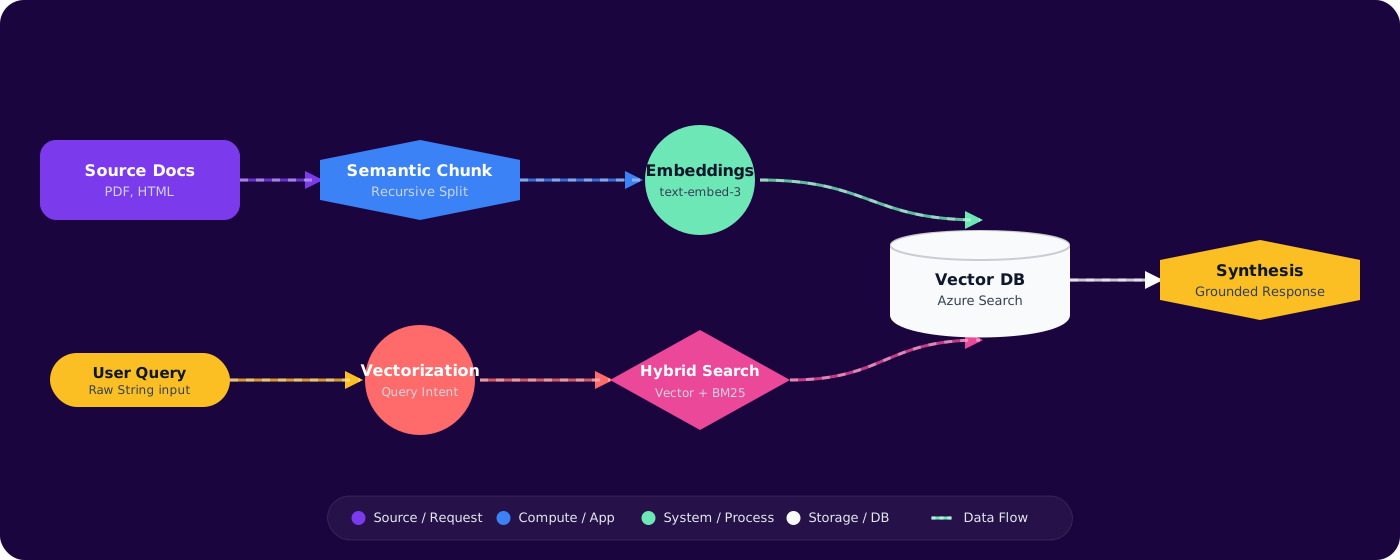
A production RAG system has four critical stages, each with its own failure modes:
      flowchart LR
          A["Document Ingestion"] --> B["Chunking and Preprocessing"]
          B --> C["Embedding and Indexing"]
          C --> D["Retrieval and Ranking"]
          D --> E["LLM Generation"]
          E --> F["Response + Citations"]

          style A fill:#4f46e5,color:#fff,stroke:#4338ca
          style B fill:#4f46e5,color:#fff,stroke:#4338ca
          style C fill:#7c3aed,color:#fff,stroke:#6d28d9
          style D fill:#7c3aed,color:#fff,stroke:#6d28d9
          style E fill:#059669,color:#fff,stroke:#047857
          style F fill:#059669,color:#fff,stroke:#047857
Stage 1: Chunking Strategies
Chunking is where most RAG systems silently fail. The wrong chunk size means either too little context (the LLM can't synthesize an answer) or too much noise (irrelevant content dilutes the signal).
Fixed-size chunking (e.g., 512 tokens with 50-token overlap) is the baseline. It's fast and predictable but ignores document structure entirely. A code sample split mid-function is useless.
Semantic chunking splits on natural boundaries — paragraphs, sections, or topic shifts detected via embedding similarity. This preserves meaning but adds preprocessing cost.
Recursive chunking first splits by structure (headings, code blocks), then subdivides large sections by token count. This is the sweet spot for most production systems.
# Recursive chunking with LangChain
      from langchain.text_splitter import RecursiveCharacterTextSplitter

      splitter = RecursiveCharacterTextSplitter(
          chunk_size=800,
          chunk_overlap=100,
          separators=["\n## ", "\n### ", "\n\n", "\n", ". ", " "],
          length_function=len,
      )

      chunks = splitter.split_documents(documents)
Rule of thumb: Start with 600–1000 token chunks, 10–15% overlap. Measure retrieval precision before optimizing further.
Stage 2: Embedding Pipeline
Your embedding model is the bottleneck you don't see. Key decisions:
- Model choice:
text-embedding-3-large(Azure OpenAI) for general use. Cohere'sembed-v3if you need multilingual. Don't useada-002for new projects — it's a generation behind. - Dimensionality: 1536 dims is standard. Azure OpenAI's large model supports
dimensionsparameter to reduce to 256 or 512 with minimal quality loss — cuts storage and search cost significantly. - Batch processing: Embed in batches of 100–500. Single-item embedding calls will destroy your throughput and cost budget.
// Azure OpenAI embedding with reduced dimensions
      var embeddingOptions = new EmbeddingGenerationOptions
      {
          Dimensions = 512  // Reduce from 3072 default
      };

      var response = await client.GenerateEmbeddingsAsync(
          new[] { "Your chunk text here" },
          embeddingOptions
      );
Stage 3: Retrieval Patterns
Vector similarity alone is often insufficient. Production systems layer multiple retrieval strategies:
Hybrid search combines vector similarity with keyword (BM25) search. Azure AI Search does this natively with search +vectorQueries in a single API call. This catches exact-match terms that embedding similarity misses.
Re-ranking applies a cross-encoder model to the top-K results from initial retrieval. This is computationally expensive per-item but dramatically improves precision when applied to 20–50 candidates. Azure AI Search offers built-in semantic ranking for this.
Query expansion rewrites the user query into multiple search variants using the LLM itself, then merges results. This handles ambiguous queries where the user's phrasing doesn't match document terminology.
Stage 4: Generation with Grounding
Pass retrieved chunks as context with explicit grounding instructions:
System: Answer the user's question using ONLY the provided context.
      If the context doesn't contain sufficient information, say so.
      Cite sources using [1], [2] notation.

      Context:
      [1] {chunk_1_text} (source: design-doc.md, section: Architecture)
      [2] {chunk_2_text} (source: api-spec.yaml, section: Endpoints)

      User: {query}
Implementation
A scalable RAG pipeline on Azure looks like this:
      flowchart TD
          subgraph Ingestion
              A["Blob Storage"] --> B["Azure Function Trigger"]
              B --> C["Document Cracking + Chunking"]
              C --> D["Azure OpenAI Embeddings"]
              D --> E["Azure AI Search Index"]
          end

          subgraph Query
              F["User Query"] --> G["Query Embedding"]
              G --> H["Hybrid Search + Semantic Ranking"]
              H --> I["Top-K Chunks"]
              I --> J["Azure OpenAI GPT-4o"]
              J --> K["Grounded Response"]
          end

          E -.->|vector index| H

          style A fill:#d97706,color:#fff,stroke:#b45309
          style E fill:#4f46e5,color:#fff,stroke:#4338ca
          style J fill:#059669,color:#fff,stroke:#047857
          style K fill:#059669,color:#fff,stroke:#047857
Key implementation details:
- Ingestion: Trigger on blob upload via Event Grid. Use Azure Document Intelligence for PDFs, images, and scanned docs — it extracts structure (tables, headings) that plain text extraction misses.
- Indexing: Azure AI Search with vector + full-text fields. Configure
vectorSearchwith HNSW algorithm,efConstruction: 400for index build quality. - Query path: Always call embedding API + search API in parallel where possible. Total retrieval should be under 200ms.
// Hybrid search with Azure AI Search
      var searchOptions = new SearchOptions
      {
          Size = 10,
          Select = { "content", "title", "source", "chunk_id" },
          QueryType = SearchQueryType.Semantic,
          SemanticSearch = new SemanticSearchOptions
          {
              SemanticConfigurationName = "default",
              QueryCaption = new QueryCaption(QueryCaptionType.Extractive)
          },
          VectorSearch = new VectorSearchOptions
          {
              Queries =
              {
                  new VectorizedQuery(queryEmbedding)
                  {
                      KNearestNeighborsCount = 20,
                      Fields = { "contentVector" }
                  }
              }
          }
      };

      var results = await searchClient.SearchAsync<SearchDocument>(
          userQuery,  // BM25 keyword search
          searchOptions  // + vector search + semantic ranking
      );
Pitfalls
1. Ignoring chunk metadata
Chunks without source information are useless for citations and debugging. Always store: source document, section heading, page number, and timestamp. When retrieval goes wrong, you need to trace which chunk caused the issue.
2. One embedding model for everything
Code, natural language, and structured data (tables, JSON) have fundamentally different semantic structures. If your corpus mixes these, consider domain-specific embedding models or separate indexes with query routing.
3. No freshness strategy
Documents change. If you don't have an incremental update pipeline, your RAG system serves stale data within weeks. Track document hashes and re-embed only changed chunks.
4. Retrieval without evaluation
You can't improve what you don't measure. Build a test set of query → expected_chunks pairs. Track Mean Reciprocal Rank (MRR) and Recall@K as you change chunking or models.
5. Over-retrieving context
Stuffing 20 chunks into the prompt doesn't help — it confuses the model and burns tokens. Start with 3–5 chunks. Measure answer quality as you increase. There's almost always a plateau after 5–7 chunks.
Practical Takeaways
- Start with recursive chunking at 600–1000 tokens. Semantic chunking adds complexity you probably don't need yet.
- Always use hybrid search (vector + BM25). Pure vector similarity misses exact terms like error codes, product names, and API endpoints.
- Measure retrieval quality separately from generation quality. Bad retrieval can't be fixed by a better LLM.
- Build incremental ingestion from day one. Full re-indexing doesn't scale past a few thousand documents.
- Budget for re-ranking. Cross-encoder re-ranking on top-20 results typically improves answer quality by 15–25% for complex queries. Late-interaction models like ColBERT v2 offer an even stronger reranking signal at lower latency.
- Consider Agentic RAG for complex queries. Instead of a single retrieve-then-generate pass, let the LLM plan multi-step retrieval: decompose questions, retrieve iteratively, self-evaluate sufficiency, and re-query when gaps are found. This dramatically improves recall on multi-hop questions.