
Problem Context
Your team has a working LLM integration. The demo is impressive. Then production happens: costs spike unpredictably, one runaway feature burns through your token budget, a model endpoint has a brownout, and you have zero visibility into which service is calling what.
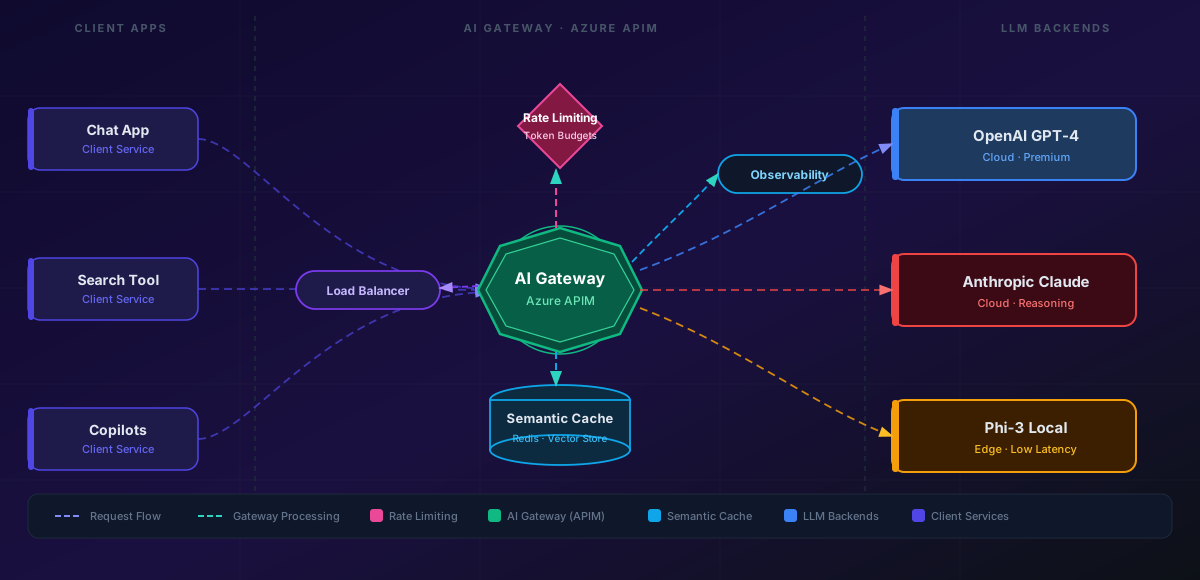
The AI Gateway pattern places an intermediary layer between your applications and LLM endpoints. It's the same pattern we've used for decades with API Gateways — but adapted for the unique characteristics of generative AI: variable latency, token-based pricing, non-deterministic outputs, and rapidly evolving model versions.
- Your LLM costs spiked 3x last month and you have no idea which feature caused it
- One team's runaway summarization job burned through the token budget for everyone
- You're calling Azure OpenAI directly from 12 different microservices with no central control
- A model endpoint went down and half your features broke because there's no fallback
This article shows you the gateway pattern that solves all four problems.
Concept Explanation
An AI Gateway sits between your application services and one or more LLM providers, providing a single control plane for traffic management, cost governance, and observability.
      flowchart LR
          subgraph Applications
              A1["Chat Service"]
              A2["Search Service"]
              A3["Code Assistant"]
          end

          subgraph AI Gateway
              GW["Azure API Management"]
              GW --> SC["Semantic Cache"]
              GW --> RL["Rate Limiting"]
              GW --> LB["Load Balancer"]
              GW --> LOG["Token Logging"]
          end

          subgraph Backends
              B1["Azure OpenAI - East US"]
              B2["Azure OpenAI - West EU"]
              B3["Claude API"]
              B4["Local Model - Phi-3"]
          end

          A1 --> GW
          A2 --> GW
          A3 --> GW
          LB --> B1
          LB --> B2
          LB --> B3
          LB --> B4

          style GW fill:#4f46e5,color:#fff,stroke:#4338ca
          style SC fill:#7c3aed,color:#fff,stroke:#6d28d9
          style RL fill:#d97706,color:#fff,stroke:#b45309
Core Capabilities
1. Token-Aware Rate Limiting
HTTP rate limiting (requests/second) doesn't work for LLMs because one request might use 50 tokens and another 4,000. You need token-based quotas: "Team X gets 500K tokens/day across all models." Azure APIM supports this with custom policies that read the usage field from OpenAI responses and decrement a quota counter.
2. Semantic Caching
If two users ask "What's our refund policy?" within an hour, why call the LLM twice? Semantic caching embeds the incoming prompt, checks similarity against recent requests, and returns a cached response if the match exceeds a threshold. This alone can cut costs 20–40% for customer-facing applications.
3. Load Balancing Across Deployments
Azure OpenAI enforces per-deployment token-per-minute (TPM) limits. A single deployment rarely has enough capacity for production traffic. The gateway round-robins or priority-routes across multiple deployments, regions, or even providers — transparently to the calling application.
4. Model Routing
Not every request needs GPT-4o. A gateway can route based on request metadata: simple classification tasks go to GPT-4o-mini, complex reasoning goes to GPT-4o, and latency-sensitive requests go to a local Phi-3 deployment.
Implementation
Azure API Management (APIM) has first-class support for AI Gateway patterns. Here's the core setup:
Step 1: Configure Multiple Backends
<!-- APIM Policy: Round-robin across Azure OpenAI deployments -->
      <set-backend-service backend-id="@{
          var backends = new[] { "aoai-eastus", "aoai-westeurope", "aoai-swedencentral" };
          var index = context.RequestId.GetHashCode() % backends.Length;
          return backends[Math.Abs(index)];
      }" />
Step 2: Token-Based Rate Limiting
<!-- Inbound: Check remaining token budget -->
      <rate-limit-by-key
          calls="1000"
          renewal-period="86400"
          counter-key="@(context.Subscription.Id)"
          remaining-calls-header-name="X-RateLimit-Remaining" />

      <!-- Outbound: Track actual token consumption -->
      <choose>
          <when condition="@(context.Response.StatusCode == 200)">
              <set-variable name="tokens" value="@{
                  var body = context.Response.Body.As<JObject>();
                  return body["usage"]?["total_tokens"]?.ToString() ?? "0";
              }" />
              <log-to-eventhub logger-id="token-logger">@{
                  return new JObject(
                      new JProperty("subscription", context.Subscription.Id),
                      new JProperty("tokens", context.Variables["tokens"]),
                      new JProperty("model", context.Request.Headers
                          .GetValueOrDefault("x-model", "unknown")),
                      new JProperty("timestamp", DateTime.UtcNow)
                  ).ToString();
              }</log-to-eventhub>
          </when>
      </choose>
Step 3: Semantic Cache with Azure Redis
<!-- Inbound: Check semantic cache -->
      <azure-openai-semantic-cache-lookup
          score-threshold="0.95"
          embeddings-backend-id="embedding-backend"
          embeddings-backend-auth="system-assigned" />

      <!-- Outbound: Store in cache -->
      <azure-openai-semantic-cache-store duration="3600" />
APIM's built-in semantic cache policy handles the embedding, similarity search, and cache management internally. You configure the similarity threshold (0.95 is a good default — aggressive enough to cache exact rephrases, conservative enough to avoid returning wrong answers).
Step 4: Content Safety
<!-- Screen prompts for jailbreak attempts -->
      <azure-openai-token-limit
          tokens-per-minute="80000"
          counter-key="@(context.Subscription.Id)"
          estimate-prompt-tokens="true" />
Pitfalls
1. Caching non-deterministic outputs
If your application relies on temperature > 0for creative outputs, semantic caching returns the same response every time. Only cache when deterministic answers are acceptable — factual Q&A, document summarization, classification.
2. Gateway becomes a single point of failure
If the gateway goes down, every AI feature goes down. Use APIM's multi-region deployment or an active-passive failover configuration. Include circuit-breaker policies that fall back to a direct endpoint if the gateway is unhealthy.
3. Ignoring streaming responses
Most LLM integrations use server-sent events (SSE) for streaming. Gateway policies that buffer the full response before forwarding break streaming latency. Ensure your gateway supports pass-through streaming and only logs token counts from the final SSE event.
4. Over-engineering routing logic
Start with simple round-robin. Sophisticated cost-optimized routing that picks the cheapest model per request sounds great until you're debugging why 10% of responses are subtly wrong because the router picked the wrong model tier. Add intelligence gradually, with evaluation metrics.
5. No fallback strategy
When Azure OpenAI returns 429 (rate limited), the gateway should automatically retry against a different deployment or region, not propagate the error. Configure retry-after with exponential backoff and cross-region failover.
Practical Takeaways
- Deploy an AI Gateway before you have cost problems, not after. Retrofitting routing and quotas into 15 different services is painful.
- Semantic caching is the highest-ROI feature. For customer-facing apps, expect 20–40% token savings with near-zero implementation effort on APIM.
- Use token-based quotas, not request-based. One summarization request can cost 100x more than a classification request.
- Log every request's token count, model, latency, and calling service. This data is how you'll optimize costs and debug quality issues.
- Start with Azure APIM's built-in AI policies rather than building custom middleware. The policies handle streaming, token counting, and cache semantics correctly out of the box.