

Multimodal From the Ground Up, Not Bolted On
Most model families added vision by training a separate image encoder and stitching it onto a text model after the fact. Gemini, out of Google DeepMind, was built the other way: text, image, video, and audio trained together from the start. That distinction sounds like marketing until you hit a task that actually depends on it — asking about what happens across a video clip, not just what a handful of sampled frames show, or feeding in audio directly instead of transcribing it first and losing tone, pauses, and overlapping speech in the process.
- You're transcribing audio with a separate ASR step before it ever reaches the LLM, and losing information doing it
- You need a model to reason over an hour of video and every other option wants you to sample and caption frames first
- You're on GCP already and want IAM, VPC-SC, and data residency handled the way the rest of your stack already handles them
- You keep hitting hallucinated answers on anything time-sensitive and want a model with built-in web grounding instead of building your own retrieval layer for it
What Native Multimodality Unlocks
A model trained jointly across modalities can attend across them in the same forward pass, rather than reasoning over a text description of an image that was generated by a separate captioning step. In practice that means Gemini can watch a video and answer questions about events that unfold over time — not just describe a frame, but track what changed between frames and what the audio track was saying while it happened. Feed it a lecture recording and it can reason about tone and emphasis, not just a flattened transcript. None of this makes Gemini strictly better at every task than a text-first model with a vision adapter bolted on; for pure text reasoning the gap is much smaller and sometimes nonexistent. It matters specifically when the input is genuinely multimodal and the modalities interact.
Pro vs Flash: Two Different Jobs
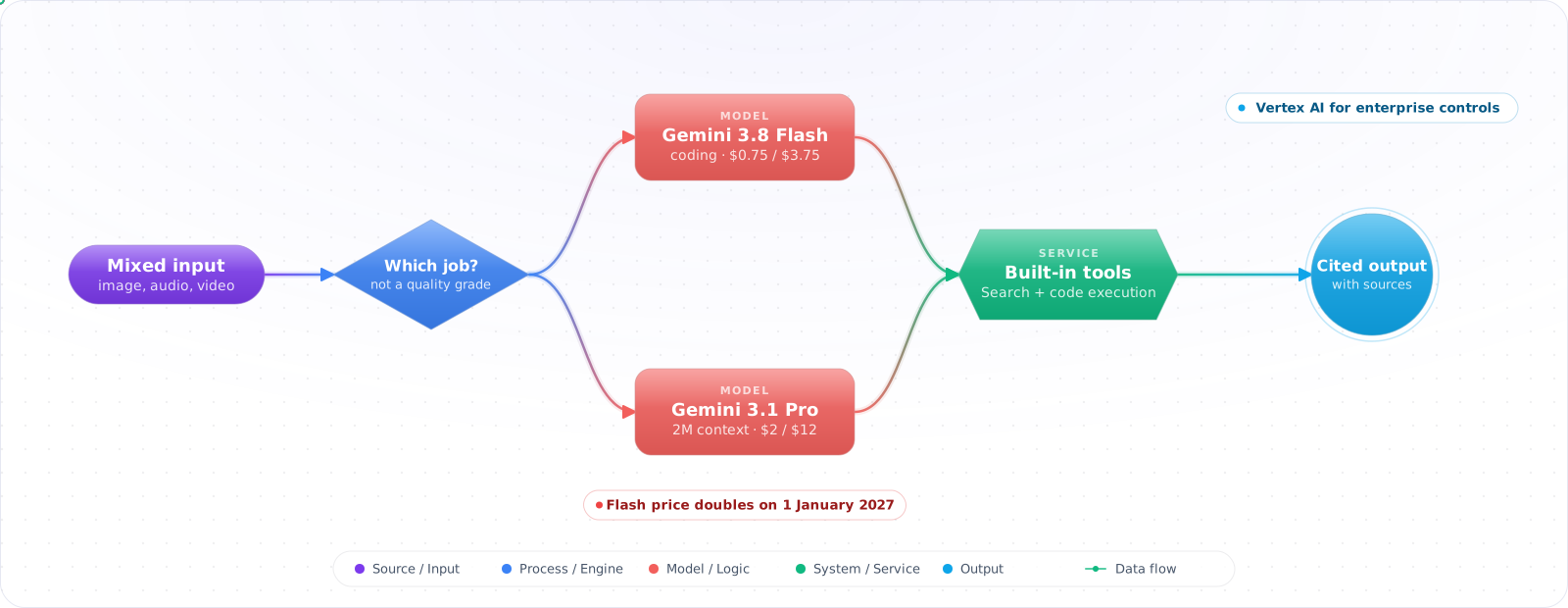
Gemini ships in two main tiers, but the split no longer maps to the frontier-vs-mini pattern the names suggest. Google has shipped Flash releases all year (3.8 Flash arrived in September 2026) while the Pro tier has stayed at 3.1 since February, still under a preview id. The result is that Flash is now the stronger model for coding and agentic work, and Pro earns its place mainly through the largest context window in the family (2M tokens) for long-document and long-video synthesis. For genuinely high-volume, latency-sensitive work there is a third tier, Flash-Lite, which is the one priced for throughput.
| Gemini Pro | Gemini Flash | |
|---|---|---|
| Optimized for | Long-context synthesis | Coding, agents, everyday reasoning |
| Context window | Largest in the family, 2M tokens | 1M tokens |
| Typical use | Whole-repo analysis, long document and video QA | Agents, coding, chat, real-time features |
| Relative cost | Higher ($2 / $12 per 1M tokens, more above 200K) | Lower ($0.75 / $3.75 until it doubles on 1 January 2027) |
Grounding With Google Search
Gemini can be configured to ground its answers in live Google Search results before generating a response — a built-in retrieval step you don't have to build yourself. For anything current-events-adjacent (pricing that changed last week, a product that shipped last month, a fact that was true at training time but isn't anymore), grounding meaningfully cuts down hallucination compared to relying on parametric knowledge alone, and the response typically comes back with citations you can surface to the user. It's not a replacement for a domain-specific RAG pipeline over your own private data — grounding only reaches the public web — but for the specific problem of "is this still true," it's a feature worth turning on rather than reimplementing.
from google import genai
from google.genai import types

client = genai.Client()  # reads GEMINI_API_KEY from the environment

response = client.models.generate_content(
    model="gemini-3.8-flash",
    contents="What's the current status of the EU AI Act's enforcement timeline?",
    config=types.GenerateContentConfig(
        tools=[types.Tool(google_search=types.GoogleSearch())],  # enables grounding
    ),
)

print(response.text)
# response.candidates[0].grounding_metadata carries the sources used,
# so you can show citations alongside the answer rather than presenting
# it as if it came from the model alone.
Code Execution as a Built-in Tool
Gemini can also be given a sandboxed code execution tool, so instead of guessing at arithmetic or the output of a small script, it writes and actually runs Python and uses the real result. This closes a specific failure mode that shows up a lot in practice: an LLM confidently getting a multi-step calculation wrong because it's pattern-matching the shape of an answer rather than computing it. For data analysis tasks, unit conversions, or anything with real arithmetic in the loop, enabling code execution is usually a better fix than prompting harder.
Vertex AI for the Enterprise
The consumer Gemini API is the fastest path to a prototype. Vertex AI is the path enterprises already on Google Cloud actually ship through, for the same reasons enterprises route through Azure OpenAI instead of the direct OpenAI API: IAM integration instead of a separate API key to manage, VPC Service Controls so traffic never leaves your security perimeter, regional endpoint selection for data residency requirements, and billing that rolls into the GCP account you already reconcile. You give up a small amount of bleeding-edge immediacy — Vertex sometimes trails the consumer API by a short window on brand-new capabilities — in exchange for a deployment story your security team has already approved.
flowchart LR
    Dev["Prototype / hackathon"] --> API["Gemini API
(consumer, API key)"]
    Prod["Production, GCP-native org"] --> Vertex["Vertex AI
(IAM, VPC-SC, regional endpoints)"]

    style API fill:#059669,color:#fff,stroke:#047857
    style Vertex fill:#4f46e5,color:#fff,stroke:#4338ca
1. Prototyping on the consumer API, then hitting a wall in procurement
If there's any chance this ships inside a GCP-native enterprise, build against Vertex AI from early on. Migrating a working integration from the consumer API to Vertex late in a project means re-plumbing auth and re-testing quota, not just swapping an endpoint URL.
2. Treating grounding as a substitute for your own RAG
Grounding reaches the public web. It has no idea about your internal wiki, your ticket history, or last quarter's pricing sheet. Use grounding for "is this current-events fact still true" and your own retrieval pipeline for anything proprietary.
3. Defaulting to Pro when Flash would do
It's tempting to reach for the top-tier model out of habit, especially early in a project when nobody's watching the bill yet. Benchmark Flash on your actual task before assuming you need Pro's reasoning depth — a lot of production traffic is more routine than the initial prototype made it feel.
4. Feeding video frame-by-frame out of old habit
If you're still sampling frames and captioning them separately before handing them to the model, you're throwing away the reason native video understanding exists. Send the video directly where the API supports it and let the model reason over the whole clip.
Key Takeaways
- Native multimodality matters specifically when modalities interact — video with audio, not just images with captions bolted on afterward.
- Pro and Flash are different jobs, not different quality grades of the same job. Benchmark on your actual task before defaulting to the expensive one.
- Grounding with Search is a real hallucination reducer for current-events queries, and a poor substitute for retrieval over your own private data.
- Vertex AI is the enterprise on-ramp — expect a short lag behind the consumer API in exchange for IAM, VPC-SC, and data residency your security team already trusts.