


Sorting Is Solved. Your Comparator Is Not.
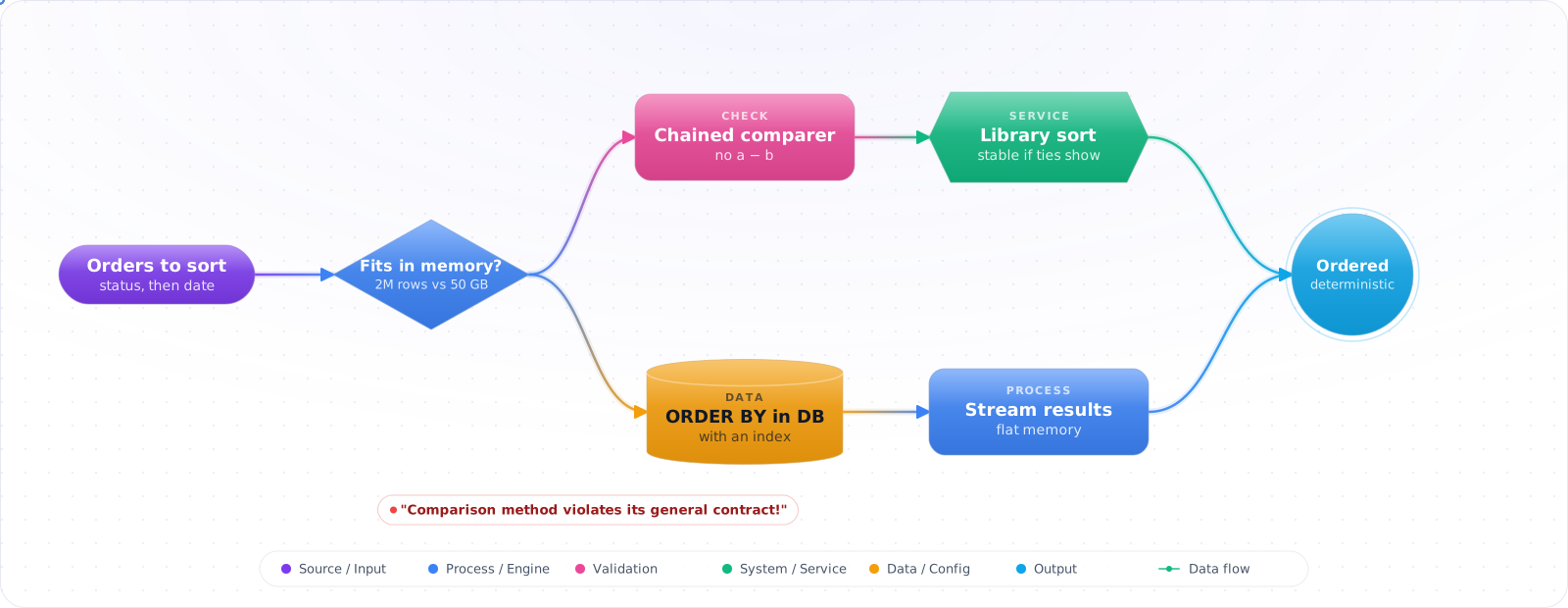
Take a typical case, made up for illustration. An admin screen crashed on some days with Java's “Comparison method violates its general contract!”. The comparator returned one total minus another, which overflowed for large orders, so the sort saw a < b and b < a both true. The same week, a nightly export ran out of memory trying to sort 50 GB in the application.
You almost never need to write a sort. The library one is faster and better tested than anything you will write in an afternoon. What you do need is a correct comparator, an opinion on stability, and the sense to sort where the data lives. Below is how the built-in sorts work, when stability matters, and what to do when the data is bigger than the machine.
- You can't remember whether
Array.Sortis stable (it isn't) - You wrote a custom comparator that returns
a - band got integer overflow - Your "sorted" result has tied keys in a different order across runs
- You're sorting a billion records on one machine and OOMing
What the Built-In Sorts Actually Do
The five sorts that matter in practice:
- Quicksort / Introsort — O(n log n) avg, in-place, not stable. .NET's default for arrays.
- Mergesort / Timsort — O(n log n) worst-case, stable, O(n) extra memory. Used by Python and by Java for objects; LINQ
OrderByuses a stable sort. - Heapsort — O(n log n) worst-case, in-place, not stable. Introsort fallback.
- Insertion sort — O(n²) worst, O(n) on nearly-sorted. Used for tiny partitions inside introsort.
- Radix sort / counting sort — O(n·k) for fixed-width keys (ints, fixed-length strings). Beats comparison sorts when k is small.
flowchart LR
    S["Sorting need?"] --> Q1{"Fits in RAM?"}
    Q1 -->|no| EXT["External merge sort<br/>(disk-backed runs)"]
    Q1 -->|yes| Q2{"Need stability?"}
    Q2 -->|yes| LINQ["LINQ OrderBy<br/>(stable)"]
    Q2 -->|no| Q3{"Fixed-width keys<br/>+ huge n?"}
    Q3 -->|yes| RADIX["Radix / counting sort<br/>O(n·k)"]
    Q3 -->|no| INTRO["Array.Sort / Span.Sort<br/>(introsort)"]

    style INTRO fill:#16a34a,color:#fff,stroke:#15803d
    style EXT fill:#0078D4,color:#fff,stroke:#005a9e
Comparators, Stability and Big Data
Step 1: 95% of the time — use the BCL
int[] arr = { 5, 2, 8, 1, 9 };
Array.Sort(arr);                     // introsort, in-place, NOT stable
arr.AsSpan().Sort();                 // .NET 5+, zero allocation

// With comparer
Array.Sort(arr, (a, b) => a.CompareTo(b));   // ✓ correct
Array.Sort(arr, (a, b) => a - b);            // ✗ overflow risk for large/negative

// Stable sort: use LINQ
var stable = arr.OrderBy(x => x).ToArray();        // stable
var multiKey = people.OrderBy(p => p.LastName)     // stable cascading sort
                     .ThenBy(p => p.FirstName)
                     .ToArray();
Step 2: Custom comparators — three rules
// Rule 1: never use subtraction (overflow). Use Comparer<T>.Default.Compare or .CompareTo
// Rule 2: must be a total order: antisymmetric, transitive, total
// Rule 3: must be deterministic (same inputs → same result)

public class PriorityComparer : IComparer<Job>
{
    public int Compare(Job? x, Job? y)
    {
        // Higher priority first; tie-break by submitted time (ascending)
        int c = y!.Priority.CompareTo(x!.Priority);
        return c != 0 ? c : x.SubmittedAt.CompareTo(y.SubmittedAt);
    }
}
Array.Sort(jobs, new PriorityComparer());
Step 3: Quicksort — partitioning is the algorithm
// Lomuto partition (simpler), median-of-three pivot (handles sorted and reversed input).
// Lomuto is still O(n²) when many keys are equal; use a three-way partition if that matters.
public static void QuickSort(int[] a) => Sort(a, 0, a.Length - 1);

static void Sort(int[] a, int lo, int hi)
{
    while (lo < hi)
    {
        if (hi - lo + 1 <= 16) { Insertion(a, lo, hi); return; }   // small-cutoff
        int p = MedianOfThree(a, lo, hi);
        int part = Partition(a, lo, hi, p);
        // Recurse on smaller half, iterate on larger → bounded stack
        if (part - lo < hi - part) { Sort(a, lo, part - 1); lo = part + 1; }
        else                       { Sort(a, part + 1, hi); hi = part - 1; }
    }
}

static int Partition(int[] a, int lo, int hi, int pivotIdx)
{
    int pivot = a[pivotIdx]; (a[pivotIdx], a[hi]) = (a[hi], a[pivotIdx]);
    int i = lo;
    for (int j = lo; j < hi; j++)
        if (a[j] < pivot) { (a[i], a[j]) = (a[j], a[i]); i++; }
    (a[i], a[hi]) = (a[hi], a[i]);
    return i;
}
Step 4: Mergesort — when stability is required
public static T[] MergeSort<T>(T[] a, IComparer<T>? cmp = null)
{
    cmp ??= Comparer<T>.Default;
    if (a.Length <= 1) return a;
    int mid = a.Length / 2;
    var left  = MergeSort(a[..mid], cmp);
    var right = MergeSort(a[mid..], cmp);
    var result = new T[a.Length];
    int i = 0, j = 0, k = 0;
    while (i < left.Length && j < right.Length)
        result[k++] = cmp.Compare(left[i], right[j]) <= 0 ? left[i++] : right[j++];
    //                                      ^^ <= preserves stability
    while (i < left.Length)  result[k++] = left[i++];
    while (j < right.Length) result[k++] = right[j++];
    return result;
}
Step 5: Counting sort for small-range integers
// O(n + k). Crushes any comparison sort when k is small.
// Values must be in 0..max; anything else throws IndexOutOfRangeException.
public static int[] CountingSort(int[] a, int max)
{
    var count = new int[max + 1];
    foreach (var x in a) count[x]++;
    var result = new int[a.Length];
    int idx = 0;
    for (int v = 0; v <= max; v++)
        while (count[v]-- > 0) result[idx++] = v;
    return result;
}
Step 6: External merge sort for data > RAM
Phase 1 — Run formation:
  Read M records (M = available RAM)
  Sort in memory
  Write to a "run" file on disk
  Repeat until input exhausted → produces N/M sorted runs

Phase 2 — k-way merge:
  Open all run files
  Use a min-heap of size k (one entry per run)
  Pop smallest, write to output, refill from that run
  Continue until all runs exhausted

For terabyte-scale: use a real engine (Spark, DuckDB, ClickHouse).
DuckDB's external sort spills to disk, so it can sort data larger than RAM on a laptop.
How Sorting Goes Wrong
1. Array.Sort is not stable. If you sort by department then by name, the BCL won't preserve the department grouping unless you sort by a composite key or use LINQ OrderBy/ThenBy.
2. a - b comparator overflow. If a = int.MaxValue and b = -1, subtraction overflows. Always use a.CompareTo(b) or Comparer<T>.Default.Compare(a, b).
3. Comparator that returns 0 for unequal items. "Equivalent for sort" ≠ "equal". That's fine for ordering but breaks if you use the comparer in a SortedDictionary or SortedSet, where 0 means "same key":SortedSet.Add returns false and drops the second item, and SortedDictionary.Add throws.
4. Quicksort worst case on adversarial input. A naive first-element pivot is O(n²) on already-sorted data. Use randomized pivot or median-of-three; introsort falls back to heapsort if recursion gets too deep.
5. Sorting in-place when you needed stability. Reach for OrderBy (uses a stable sort under the hood) or sort by composite tuples that include the original index.
6. Sorting in memory when you should stream. A 50GB CSV doesn't fit in RAM. Use external merge sort, DuckDB, or just sort(1) on the command line (GNU sort handles disk spilling and parallel merge for free).
What I Reach For
- Default to
Array.Sort/Span.Sort. It's introsort and it's fast. - Need stability? Use
OrderBy/ThenBy. - Comparators: never subtract. Use
CompareToorComparer<T>.Default. - Counting/radix sort beats comparison sorts when keys are small fixed-width integers and n is huge.
- Data > RAM? External merge sort or a vectorized engine (DuckDB, Spark, ClickHouse).
- Sort by composite tuple
(primary, secondary, originalIndex)when you need a deterministic stable result with the BCL default. - Profile before micro-optimizing. Allocations and comparator complexity dominate, not the sort algorithm.
Sorting at Scale
Inside one process, sorting is solved: call the standard library. The interesting problems appear when the data doesn't fit, or when you only need part of the result.
If you need the top 10 of a million items, don't sort a million items. A bounded heap of size k runs in O(n log k), and it uses memory for only k items. .NET has PriorityQueue, Python has heapq.nlargest, and in SQL, ORDER BY ... LIMIT 10 with the right index reads just 10 rows. The same applies to pagination, where OFFSET 100000 makes the database sort and discard 100,000 rows. Keyset pagination, WHERE id > :last ORDER BY id LIMIT 20, stays fast at any depth.
External sorting
When data exceeds memory, split it into runs that fit, sort each one, and write them out. Then merge the sorted runs with a k-way merge, using a heap. This is what databases do when a sort spills to disk, and it's why a query can suddenly get slow when it crosses work_mem in Postgres. If you see "external merge" in an EXPLAIN ANALYZE, you've found your slow query, and an index or more working memory will usually fix it.
Stability and multi-key sorts
A stable sort keeps equal items in their original order, and that property is easy to depend on by accident. Python's sorted, and Java's Collections.sort for objects, are stable. .NET's List.Sort and Array.Sort are not, though LINQ's OrderBy is. So code that "works" with one API can scramble ties with another. Be explicit, and add a tie-breaker such as the ID, which also makes pagination deterministic.
Locale and comparison
Text sorting is a common source of bugs. Sorting strings by byte value puts "Zebra" before "apple", and handles "ä" badly. Use a locale-aware comparer or a database collation for anything users will see, and an ordinal comparison for internal keys and lookups. Comparators must also be consistent. If a < b and b < a can both hold, as can happen with NaN or a sloppy subtraction-based comparator, some sort implementations throw, and others quietly return wrong results.