Start With No Secret to Pass
If your infrastructure code creates nothing that needs a password or a key, there is nothing to manage here. The risk starts when a resource needs a credential, because the question then is every place that value ends up.
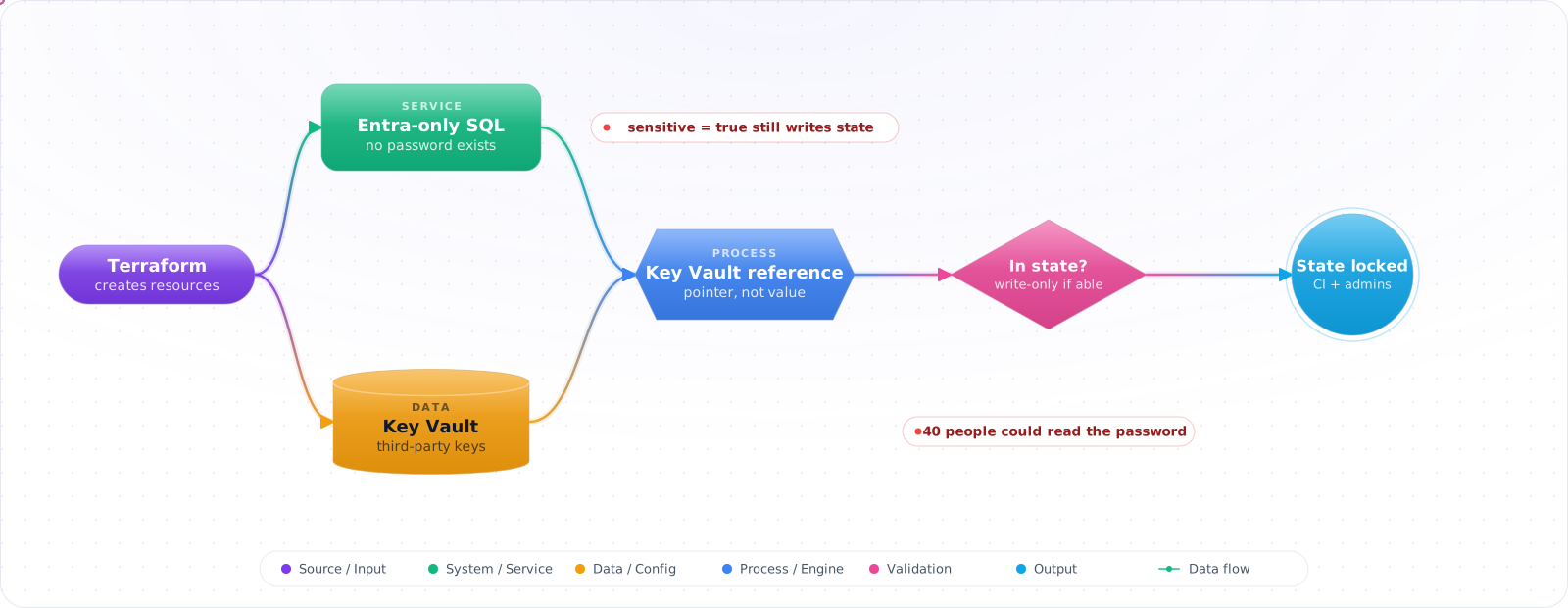
Take a typical case, made up for illustration. A security review asked where the SQL admin password lived. The answer was a tfvars file, a variable marked sensitive, and therefore safe. Except sensitive only hides values from plan output. The password was in the state file in plain text, and around forty people could read the state storage account.
Infrastructure code has to deal with secrets, and most of the risk is in where those values end up. Below is the pattern I would use on Azure: remove secrets with managed identity where you can, keep the rest in Key Vault and reference them, keep values out of state where the tooling allows, and lock down state for whatever remains.
- A secret was found in Git history — you rotated it, but you're not sure where else it spread
- Your CI pipeline echoes secrets to build logs because of
set -xdebugging - Terraform state contains plaintext passwords because you used
sensitive = false - Your deployment requires someone to manually inject a secret before every run
Azure Key Vault: The Recommended Pattern
Store secrets in Azure Key Vault. Reference them from IaC at deploy time. Applications retrieve them at runtime using managed identities — no secrets in environment variables, no secrets in config files.
Create Key Vault with Bicep
param keyVaultName string
param location string = resourceGroup().location
param tenantId string = subscription().tenantId

resource kv 'Microsoft.KeyVault/vaults@2023-07-01' = {
  name: keyVaultName
  location: location
  properties: {
    sku: { family: 'A', name: 'standard' }
    tenantId: tenantId
    enableRbacAuthorization: true        // Use RBAC, not access policies
    enableSoftDelete: true
    softDeleteRetentionInDays: 90
    enablePurgeProtection: true          // Production: prevent accidental purge
    networkAcls: {
      defaultAction: 'Deny'             // Deny all by default: deployments and apps then need a private endpoint or firewall rule
      virtualNetworkRules: []
      ipRules: []
    }
  }
}
Reference Key Vault secrets in Bicep parameters
// main.prod.bicepparam
using './main.bicep'

param sqlAdminPassword = getSecret(
  'subscription-id',
  'rg-secrets',
  'kv-prod-001',
  'sql-admin-password'
)
// Azure fetches the secret at deploy time — never stored in bicepparam files
Terraform: Sensitive Variables and Key Vault Integration
Marking variables and outputs as sensitive
# variables.tf
variable "db_password" {
  description = "Database administrator password"
  type        = string
  sensitive   = true   # Redacted from plan output and logs
}

# outputs.tf
output "connection_string" {
  value     = "Server=...;Password=${var.db_password}"
  sensitive = true   # Redacted from CLI output, but still stored in state and plan files
}
Reading secrets from Key Vault in Terraform
data "azurerm_key_vault" "main" {
  name                = "kv-prod-001"
  resource_group_name = "rg-secrets"
}

data "azurerm_key_vault_secret" "db_password" {
  name         = "sql-admin-password"
  key_vault_id = data.azurerm_key_vault.main.id
}

resource "azurerm_mssql_server" "main" {
  name                         = "sql-prod-001"
  resource_group_name          = azurerm_resource_group.main.name
  location                     = azurerm_resource_group.main.location
  version                      = "12.0"
  administrator_login          = "sqladmin"
  administrator_login_password = data.azurerm_key_vault_secret.db_password.value
}
This keeps the secret out of your code, not out of state: Terraform stores the value it read in the state file, so encrypt and lock down that backend.
Injecting secrets in CI without storing them
# GitHub Actions — inject from repository secrets.
# Variable values are captured in the plan, so set TF_VAR_ on the plan step.
# Setting it on apply can't change a saved plan, and tfplan itself holds the value.
- name: Terraform Plan
  env:
    TF_VAR_db_password: ${{ secrets.DB_PASSWORD }}
    ARM_CLIENT_SECRET: ${{ secrets.ARM_CLIENT_SECRET }}
  run: terraform plan -out=tfplan

- name: Terraform Apply
  env:
    ARM_CLIENT_SECRET: ${{ secrets.ARM_CLIENT_SECRET }}
run: terraform apply -auto-approve tfplanCheck it: Pull your state file and search it for a password you know. Then list who can read that backend.
Pulumi Secrets
Pulumi encrypts secrets in the state file using a per-stack encryption key (managed by Pulumi Cloud, or a KMS key for self-hosted state):
# Set a secret config value — encrypted in Pulumi.prod.yaml
pulumi config set --secret dbPassword "super-secret-value"

# Retrieve in code (TypeScript)
const config = new pulumi.Config();
const dbPassword = config.requireSecret('dbPassword');
// Type: pulumi.Output<string> — treated as secret throughout the graph

# Mark an output as secret
export const connectionString = pulumi.secret(
  pulumi.interpolate`Server=...;Password=${dbPassword}`
);
The Best Secret Is the One You Do Not Have
Every pattern above manages a secret more safely. Where you can, remove the secret instead. Most credentials in an infrastructure pipeline exist only so that one system can prove its identity to another, and identity federation does that without a stored value.
- Pipeline to cloud: use OpenID Connect federation. The CI system presents a short-lived signed token, and the cloud provider exchanges it for temporary credentials limited to one repository, branch or environment. There is no client secret to rotate or leak.
- Workload to cloud service: use managed identities, or workload identity on Kubernetes. The application receives a token from the platform at runtime and is granted access by role assignment.
- Service to database: prefer directory authentication over passwords where the database supports it.
Whatever secrets remain belong in a vault and are referenced by name. Remember that state files can contain secret values in plain text even when the configuration does not, so encrypt the state backend and restrict who can read it as carefully as the vault itself.
Check it: List the credentials your pipeline holds. Each one that reaches a cloud is a candidate for federation.
What NOT to Do
# ❌ Never store secrets in tfvars committed to Git
db_password = "MyPassword123"    # terraform.tfvars

# ❌ Never use plaintext in parameter files
{
  "parameters": {
    "sqlAdminPassword": { "value": "MyPassword123" }
  }
}

# ❌ Never output secrets without marking them sensitive (Terraform)
output "db_password" {
  value = var.db_password
  # Missing: sensitive = true
}

# ❌ Never hardcode in Pulumi config without --secret flag
pulumi config set dbPassword "MyPassword123"   # Stored plaintext in Pulumi.yaml
Runtime Secret Access: Managed Identity Pattern
Applications should never receive secrets as environment variables or config files. Instead, grant them managed identity access to Key Vault and let them retrieve secrets at runtime:
// Bicep: grant app service identity access to Key Vault
resource kvSecretReaderRole 'Microsoft.Authorization/roleAssignments@2022-04-01' = {
  name: guid(kv.id, appService.id, 'KeyVaultSecretsUser')
  scope: kv
  properties: {
    roleDefinitionId: subscriptionResourceId(
      'Microsoft.Authorization/roleDefinitions',
      '4633458b-17de-408a-b874-0445c86b69e6'   // Key Vault Secrets User
    )
    principalId: appService.identity.principalId
    principalType: 'ServicePrincipal'
  }
}Check it: Read your app's settings. They should hold a reference to the vault or nothing at all, and never a secret value.
Production Checklist
- Run
git secretsortrufflehogin CI to scan for accidental secret commits - Mark all sensitive Terraform variables and outputs with
sensitive = true - Never commit
.tfvarsfiles containing secrets — use CI environment variables or Key Vault data sources - Enable Key Vault soft-delete and purge protection in all environments
- Use managed identity + RBAC for application secret access — no stored credentials
- Rotate secrets on a schedule; use Key Vault versioning to support zero-downtime rotation
- Audit Key Vault access logs — alert on unexpected reads
Try It on Your Own System This Week
Three checks on infrastructure code that handles credentials, about an hour in total:
- Search your repositories for variable and parameter files with values in them. A secret in a file is a secret in Git history.
- Search your build logs for a secret you know. Debug output can echo them.
- Check that soft-delete and purge protection are on for every vault. They are what stands between a mistake and a lost secret.
Moving to Secretless
The best approach to secrets in infrastructure code is to stop having them. Most clouds now let workloads authenticate with an identity instead of a stored credential, and each secret you remove is one less thing to rotate, store and leak.
For pipelines, use OIDC federation. GitHub Actions or Azure DevOps exchanges a short-lived token for cloud credentials, with no client secret stored anywhere. Scope the trust to a specific repository and branch, because a federation rule that trusts a whole organisation is much weaker than it looks. For workloads, use managed identities on Azure, IAM roles on AWS, and workload identity on Kubernetes, so that pods authenticate as themselves.
Keep what's left out of state
If a secret has to exist, use write-only arguments and ephemeral resources, where your provider supports them, so that it never lands in the Terraform state file. When you can't, generate the secret outside Terraform, store it in Key Vault or Secrets Manager, and have your app read it at runtime. Terraform then only manages the reference. Remember that sensitive = true only hides a value from CLI output. It stays in state as plain text, which catches a lot of people out.
Rotation
A rotation plan is what separates a secret you're managing from one you're hoping about. Automate it, and check that apps pick up new values without a restart. Support two active versions during rotation, so that there's no moment when the old one is revoked and the new one hasn't been loaded. Start with a monthly rotation on a non-critical secret to prove the process works.
External Secrets Operator is the common way to sync secrets into Kubernetes from a vault, and the CSI driver can mount them without creating a Kubernetes Secret at all. Either beats putting values in a Helm file.
Agents and secrets
Coding agents add a new leak path. An agent with shell access can read a .env file, and anything it reads can end up in a prompt, a log or a third-party service. Keep production secrets out of developer machines where agents run, give agents short-lived, narrow credentials, and run scanners such as Gitleaks in CI and in pre-commit hooks. If a secret does get committed, rotate it right away. Deleting the commit doesn't help, as it may already be in forks, caches or logs.