

Problem Context
You've accumulated years of technical knowledge — notes from conferences, bookmarked articles, highlighted PDFs, internal design docs, personal wikis, and thousands of Slack threads. When you need to find something, you vaguely remember you read about it somewhere, but searching across all those sources is painful or impossible.
A personal AI knowledge base solves this: ingest your content, embed it, and query it conversationally. "What was that caching strategy from the talk at NDC last year?" becomes a question you can actually answer — with references to your own notes.
- You have notes in Notion, Obsidian, OneNote, and plain text files — and can never find anything
- You bookmarked dozens of architecture articles but can't remember which one had the pattern you need
- You want to ask questions about your own documents, not just the internet
- You've been meaning to organize your knowledge for years but never have the time
This article builds a personal RAG system step-by-step — from ingesting your content to querying it conversationally.
Concept Explanation
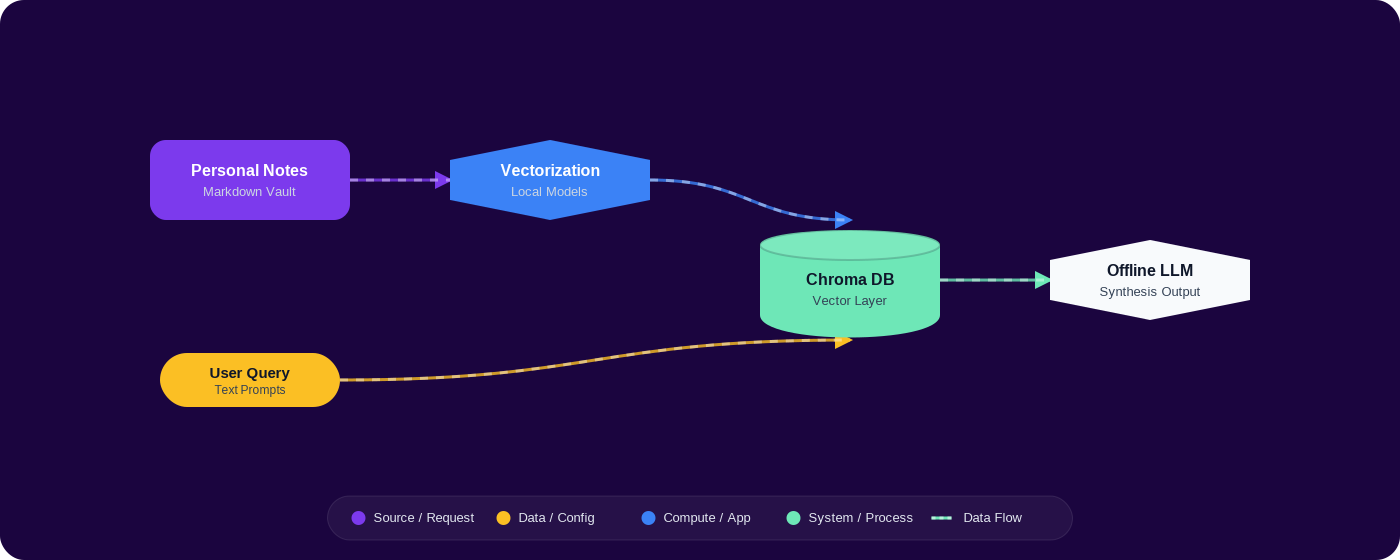
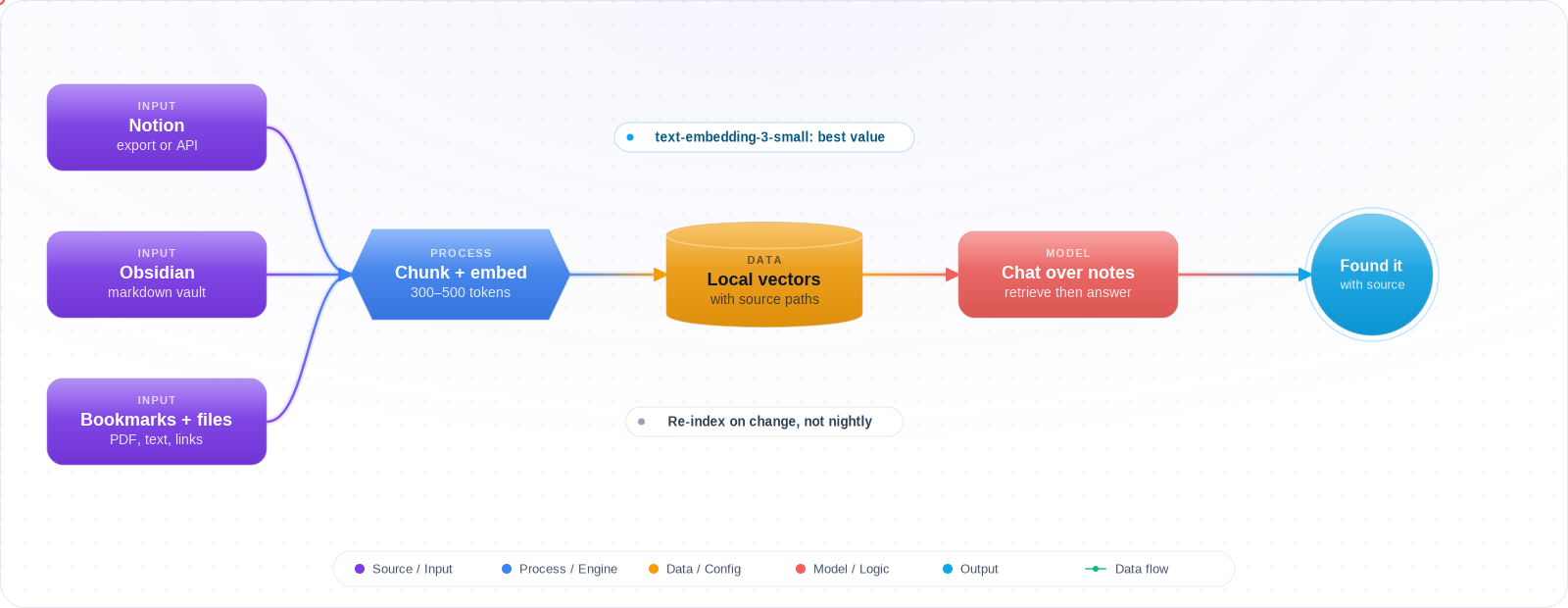
A personal knowledge base is a RAG (Retrieval-Augmented Generation) system scoped to your own content. The architecture is simple: ingest documents → chunk them → embed chunks → store in a vector database → query with natural language → generate answers with citations.
      flowchart TD
          S["Sources\n(Notes, PDFs, Bookmarks)"] --> I["Ingestion\n(parse + chunk)"]
          I --> E["Embedding\n(text → vectors)"]
          E --> V["Vector Store\n(Azure AI Search / FAISS)"]

          Q["Your Question"] --> QE["Query Embedding"]
          QE --> V
          V -->|"Top-K chunks"| LLM["LLM\n(generate answer)"]
          LLM --> A["Answer + Citations"]

          style S fill:#4f46e5,color:#fff,stroke:#4338ca
          style V fill:#059669,color:#fff,stroke:#047857
          style LLM fill:#7c3aed,color:#fff,stroke:#6d28d9
Key Design Decisions
Chunking strategy: How you split documents determines retrieval quality. Too large (whole documents) means the embedding captures too many topics. Too small (individual sentences) loses context. A common starting point for technical content: 300-500 tokens per chunk with 50-token overlap.
Embedding model: For personal use, Azure OpenAI's text-embedding-3-small is a good low-cost default. text-embedding-3-large is worth considering when quality matters more than cost. For fully local operation, nomic-embed-text or mxbai-embed-large via Ollama provide good quality with zero API costs.
Vector store: For a personal system, you don't need a distributed database. sqlite-vec (the SQLite vector extension, still pre-v1, so expect breaking changes) is a good local choice — it's a single file and zero-config. Use FAISS for an in-process index, or Azure AI Search for a hosted one with richer querying.
Implementation
Step 1: Content Ingestion Pipeline
public class ContentIngester
{
    public async IAsyncEnumerable<DocumentChunk> IngestDirectory(string path)
    {
        var files = Directory.GetFiles(path, "*.*", SearchOption.AllDirectories)
            .Where(f => SupportedExtensions.Contains(Path.GetExtension(f)));

        foreach (var file in files)
        {
            var content = Path.GetExtension(file) switch
            {
                ".md" => await File.ReadAllTextAsync(file),
                ".txt" => await File.ReadAllTextAsync(file),
                ".html" => HtmlToText(await File.ReadAllTextAsync(file)),
                ".pdf" => await ExtractPdfText(file),
                _ => null
            };

            if (string.IsNullOrWhiteSpace(content)) continue;

            var chunks = _chunker.Chunk(content, maxTokens: 400, overlap: 50);
            foreach (var chunk in chunks)
            {
                yield return new DocumentChunk
                {
                    Source = file,
                    Content = chunk,
                    Title = Path.GetFileNameWithoutExtension(file),
                    CreatedAt = File.GetCreationTime(file)
                };
            }
        }
    }
}
Step 2: Embedding and Indexing
public class KnowledgeIndexer
{
    private readonly EmbeddingClient _embeddingClient;
    private readonly IVectorStore _store;

    public async Task IndexChunks(IAsyncEnumerable<DocumentChunk> chunks)
    {
        var batch = new List<DocumentChunk>();

        await foreach (var chunk in chunks)
        {
            batch.Add(chunk);
            if (batch.Count >= 50)
            {
                await EmbedAndStoreBatch(batch);
                batch.Clear();
            }
        }

        if (batch.Count > 0)
            await EmbedAndStoreBatch(batch);
    }

    private async Task EmbedAndStoreBatch(List<DocumentChunk> batch)
    {
        var texts = batch.Select(c => c.Content).ToList();
        var embeddings = await _embeddingClient.GenerateEmbeddingsAsync(texts);

        for (int i = 0; i < batch.Count; i++)
        {
            batch[i].Embedding = embeddings.Value[i].ToFloats().ToArray();
        }

        await _store.UpsertAsync(batch);
    }
}
Step 3: Conversational Query Interface
public class KnowledgeAssistant
{
    public async Task<AnswerWithSources> AskAsync(string question)
    {
        // Embed the question
        var queryEmbedding = await _embeddingClient.GenerateEmbeddingAsync(question);

        // Retrieve relevant chunks
        var results = await _store.SearchAsync(
            queryEmbedding.Value.ToFloats().ToArray(),
            topK: 5);

        // Build context from retrieved chunks
        var context = string.Join("\n\n---\n\n",
            results.Select(r => $"[Source: {r.Source}]\n{r.Content}"));

        // Generate answer with citations
        var messages = new List<ChatMessage>
        {
            new SystemChatMessage("""
                Answer the question using ONLY the provided context.
                Cite sources in [brackets] when referencing specific information.
                If the context doesn't contain the answer, say so.
                """),
            new UserChatMessage($"Context:\n{context}\n\nQuestion: {question}")
        };

        var response = await _chatClient.CompleteChatAsync(messages);

        return new AnswerWithSources
        {
            Answer = response.Value.Content[0].Text,
            Sources = results.Select(r => r.Source).Distinct().ToList()
        };
    }
}
Step 4: Incremental Updates
public class IncrementalSync
{
    public async Task SyncChanges(string watchDir)
    {
        var lastSync = await _store.GetLastSyncTime();
        var changed = Directory.GetFiles(watchDir, "*.*", SearchOption.AllDirectories)
            .Where(f => File.GetLastWriteTime(f) > lastSync)
            .Where(f => SupportedExtensions.Contains(Path.GetExtension(f)));

        foreach (var file in changed)
        {
            // Remove old chunks for this file
            await _store.DeleteBySourceAsync(file);

            // Re-ingest
            await foreach (var chunk in _ingester.IngestFile(file))
            {
                var embedding = await _embeddingClient.GenerateEmbeddingAsync(chunk.Content);
                chunk.Embedding = embedding.Value.ToFloats().ToArray();
                await _store.UpsertAsync(chunk);
            }
        }

        await _store.SetLastSyncTime(DateTimeOffset.UtcNow);
    }
}
Pitfalls
1. Chunking too aggressively
Single-sentence chunks lose context. The embedding captures the sentence but not enough surrounding meaning for useful retrieval. Chunk at paragraph or section boundaries with overlap, aiming for 300-500 tokens per chunk.
2. Not preserving metadata
Knowing where information came from is as important as finding it. Store source file path, section title, creation date, and any tags. Citations without sources aren't useful for knowledge work.
3. Embedding everything at once
Initial bulk embedding of 10K documents takes time and money. Start with your most valuable content (recent notes, key docs) and add incrementally. You'll also want to iterate on chunking strategy — doing it on your whole corpus first is wasteful.
4. No deduplication
If you export notes from multiple sources, duplicates are common. Similar chunks create noisy search results where the top 5 results are all the same content from different sources. Deduplicate during ingestion using content hashing.
Keeping It Useful After the First Month
A personal knowledge base usually fails slowly. You index everything you own, it feels magical for a week, and six months later it confidently quotes a note you wrote in 2023 about a tool you no longer use. The hard part is keeping it trustworthy, and three habits do most of the work.
Treat dates as first-class data. Store when each note was written and last edited, and show that date next to every citation. When two notes disagree, you want to see that one is three years newer. A simple boost for recent documents at ranking time fixes a lot of "why did it say that?" moments.
Make ingestion incremental. Hash each file, and only re-embed what changed. Without this, the re-index gets slow enough that you stop running it, and the system drifts from your actual notes without telling you. A nightly job with a small report of what was added, changed and removed is enough. If you change your embedding model, plan to re-embed everything, because vectors from different models can't be compared.
Evaluate it with your own questions. Keep a file of 20 questions you actually asked, along with the note that should answer each. Run them when you change the chunking, the model or the retrieval settings. It takes a few minutes, and it stops you from tuning by feel.
Local or hosted?
Small open-weight models are now good enough for this job, and privacy is often the whole reason to build it yourself. Running embeddings and a small model through Ollama means your notes never leave your laptop, at the cost of slower answers and some loss of quality on hard questions. A reasonable middle ground is local embeddings and search, with a hosted model for the final answer on anything non-sensitive. The retrieval then stays on your machine, and only the few chunks you need are sent out.
Be honest about what a chat box is for. Often the most useful feature is search with good citations, because reading the source yourself is faster than reading a summary of it. Build that first, and add generation on top if you still want it.
If you connect the knowledge base to a coding agent or desktop assistant, expose it through a small MCP server with one or two read-only tools. Then every client you use can search your notes, and there is only one integration to maintain. Keep it read-only, because your notes contain things you pasted from the web, and that makes them an injection path.
Practical Takeaways
- Start small with your most used content. Index your last 3 months of notes, not your entire digital history. Iterate on quality before scaling quantity.
- Chunk at semantic boundaries. Headings, paragraphs, and sections make natural chunk boundaries. Fixed-size chunks that split mid-sentence produce poor embeddings.
- Preserve rich metadata. Source, date, title, tags — all searchable, all useful for filtering results and providing citations.
- Build incremental sync from day one. Your knowledge base is only useful if it stays current. File watchers or scheduled syncs keep it fresh without manual re-indexing.
- Local-first is viable. Ollama + sqlite-vec gives you a fully private, zero-cost knowledge base for personal use. Move to cloud services only if you need multi-device access or larger scale.