Start With the Provider SDK
For one prompt and one model call, use the provider's SDK directly. There's nothing to orchestrate yet, and a framework would only add concepts. A framework earns its place once the model has to call your own code, because that's where the loop, the retries and the tracing come from.
The first agent most .NET teams build is a while loop around a chat completion call. It works in the demo. Then it needs retries, then a second tool, then memory between sessions, then tracing so someone can explain why it did what it did, and the loop slowly turns into a framework nobody meant to write.
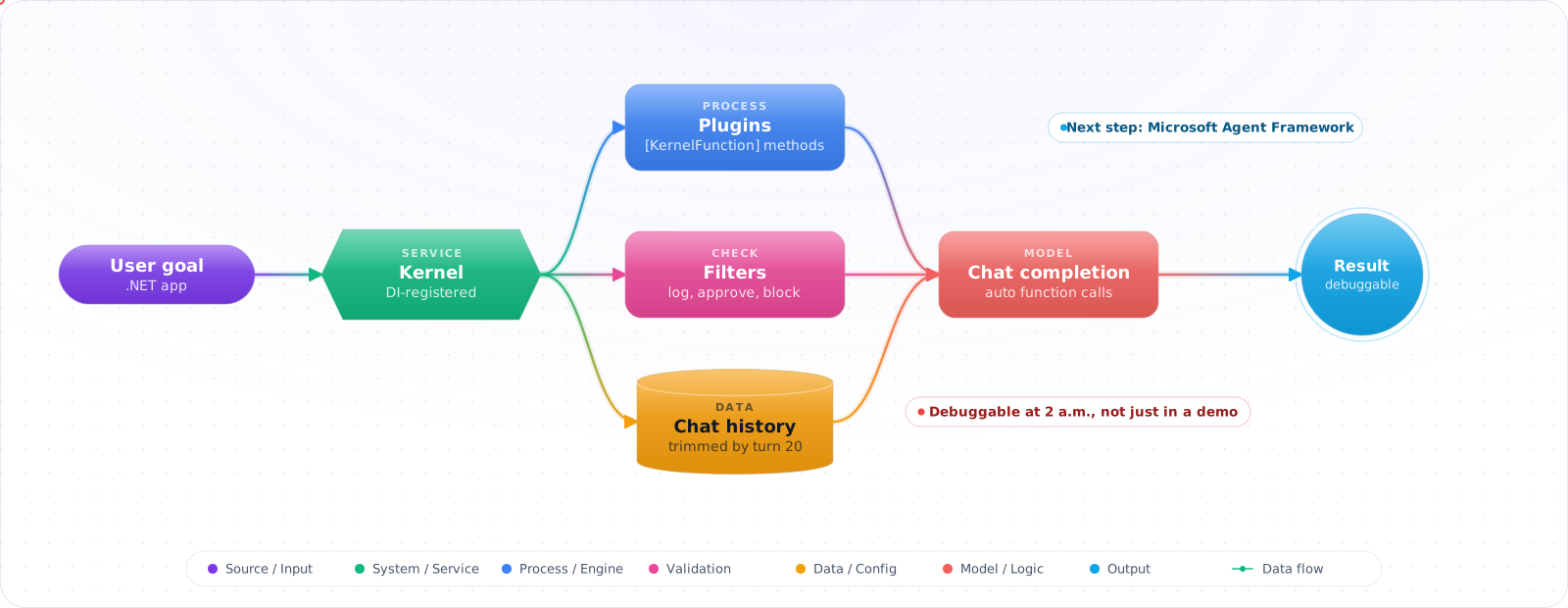
Semantic Kernel is Microsoft's answer to that: plugins built from ordinary C# methods, automatic function calling, model connectors you can swap, and hooks for memory and telemetry. It is also part-way through folding into Microsoft Agent Framework, so the advice below favours patterns that carry over. The goal is an agent you can debug at 2 a.m., not just one that impresses in a meeting.
- You've built a chatbot and now need to add tool-calling, but the plumbing code is spiraling out of control
- Your agent works in demos but crashes in production when the LLM returns unexpected function arguments
- You need conversation memory that persists across sessions but don't want to build your own storage layer
- You've heard of Semantic Kernel but aren't sure if it's a framework or an SDK or a full agent platform
The Pieces Semantic Kernel Gives You
Semantic Kernel is a lightweight orchestration SDK. It connects LLMs to your code through plugins (functions the LLM can call),memory (persistent context), and agents (autonomous task executors like ChatCompletionAgent and AgentGroupChat). The kernel is the glue between your business logic and the AI model. SK also natively integrates with MCP servers, allowing agents to discover and use external tools via the open standard.
      sequenceDiagram
          autonumber
          participant U as User
          participant K as Semantic Kernel
          participant LLM as Azure OpenAI
          participant S as Search Plugin
          participant E as Email Plugin
          U->>K: User message
          K->>LLM: Chat + plugin schemas
          LLM-->>K: function_call: search_docs
          K->>S: search_docs(query)
          S-->>K: results
          K->>LLM: Tool result
          LLM-->>K: function_call: send_email
          K->>E: send_email(to, body)
          E-->>K: sent
          K->>LLM: Tool result
          LLM-->>K: Final answer
          K-->>U: Final response
Core Concepts
Plugins: Collections of functions that the LLM can invoke. Each function has a description (for the LLM) and a .NET implementation. Plugins are how your agent interacts with the real world — databases, APIs, file systems.
Auto Function Calling: When enabled, Semantic Kernel automatically handles the LLM's tool-call requests. The LLM decides which function to call, the kernel executes it, feeds the result back, and the LLM continues — all transparently.
Chat History: Managed conversation state that includes user messages, assistant responses, and function call results. This is the agent's working memory for the current conversation.
Building the Agent, Piece by Piece
Step 1: Kernel Setup with Plugins
The kernel is registered once at start-up, with the model connector and the plugins the assistant may use.
// Program.cs — Configure Semantic Kernel
var builder = Kernel.CreateBuilder();

builder.AddAzureOpenAIChatCompletion(
    deploymentName: "gpt-5.6-sol",
    endpoint: config["AzureOpenAI:Endpoint"]!,
    credentials: new DefaultAzureCredential()
);

// Register plugins
builder.Plugins.AddFromType<DocumentSearchPlugin>();
builder.Plugins.AddFromType<EmailPlugin>();
builder.Plugins.AddFromType<CalendarPlugin>();

var kernel = builder.Build();
Check it: Start the application, resolve the kernel from the container and list the plugins it holds. If a plugin is missing here, the model will never be offered it.
Step 2: When the model needs your services, wrap them as a plugin
public class DocumentSearchPlugin
{
    private readonly ISearchService _search;

    public DocumentSearchPlugin(ISearchService search) => _search = search;

    [KernelFunction("search_documents")]
    [Description("Search the knowledge base for documents matching a query")]
    public async Task<string> SearchAsync(
        [Description("The search query")] string query,
        [Description("Maximum results to return")] int maxResults = 5)
    {
        var results = await _search.SearchAsync(query, maxResults);

        return JsonSerializer.Serialize(results.Select(r => new
        {
            r.Title,
            r.Snippet,
            r.Url,
            r.Score
        }));
    }
}
Check it: Call the plugin method from a unit test, with no kernel and no model. It should behave like any other C# method. Then read its description and ask whether it says exactly when to call it.
Step 3: Agent Execution with Auto Function Calling
public class AssistantAgent
{
    private readonly Kernel _kernel;
    private readonly ChatHistory _history;

    public AssistantAgent(Kernel kernel)
    {
        _kernel = kernel;
        _history = new ChatHistory("""
            You are a helpful work assistant. You can search documents,
            send emails, and manage calendar events.
            Always confirm before sending emails or creating events.
            """);
    }

    public async Task<string> ProcessAsync(string userMessage)
    {
        _history.AddUserMessage(userMessage);

        var settings = new OpenAIPromptExecutionSettings
        {
            FunctionChoiceBehavior = FunctionChoiceBehavior.Auto(),
            Temperature = 0.3
        };

        var result = await _kernel.GetRequiredService<IChatCompletionService>()
            .GetChatMessageContentAsync(_history, settings, _kernel);

        _history.AddAssistantMessage(result.Content ?? "");
        return result.Content ?? "";
    }
}
Check it: Ask one question that needs the plugin and one that doesn't. The first should call the function and the second shouldn't. If both do, the description is too broad.
Step 4: When a function fails, return the error as content
// Plugin with proper error handling
[KernelFunction("get_user_profile")]
[Description("Get a user's profile by their email address")]
public async Task<string> GetUserProfileAsync(
    [Description("User email address")] string email)
{
    try
    {
        var user = await _userService.GetByEmailAsync(email);
        if (user == null)
            return JsonSerializer.Serialize(new { error = "User not found", email });

        return JsonSerializer.Serialize(new { user.Name, user.Role, user.Department });
    }
    catch (Exception ex)
    {
        // Return error as content — don't throw
        // The LLM can reason about the error and try alternatives
        return JsonSerializer.Serialize(new
        {
            error = "Failed to fetch user profile",
            retryable = ex is TimeoutException
        });
    }
}
Key pattern: Handle expected failures in the plugin and return a short, safe error as content. If a plugin throws during auto-invocation, Semantic Kernel sends the exception message to the model. The LLM can reason about errors and self-correct, so give it a message you are happy to expose.
Check it: Make the plugin's backing service fail. The model should receive a short, safe message and tell the user what went wrong. Read that message the way a user would, because whatever you return can end up in the reply.
Step 5: When conversations span sessions, persist the history
// Persist chat history across sessions
public class PersistentAgent
{
    private readonly Kernel _kernel;
    private readonly IChatHistoryStore _store;

    public async Task<string> ProcessAsync(string sessionId, string message)
    {
        var history = await _store.LoadAsync(sessionId)
            ?? new ChatHistory("You are a helpful assistant.");

        history.AddUserMessage(message);

        var settings = new OpenAIPromptExecutionSettings
        {
            FunctionChoiceBehavior = FunctionChoiceBehavior.Auto()
        };

        var result = await _kernel.GetRequiredService<IChatCompletionService>()
            .GetChatMessageContentAsync(history, settings, _kernel);

        history.AddAssistantMessage(result.Content ?? "");
        await _store.SaveAsync(sessionId, history);

        return result.Content ?? "";
    }
}
Check it: Start a conversation, restart the application and carry on. The assistant should still have the context. Then hold a very long conversation and confirm the history is trimmed or summarised before it reaches the context limit.
Where Semantic Kernel Stands Now: Microsoft Agent Framework
Microsoft now describes Agent Framework as the direct successor to both Semantic Kernel and AutoGen, built by the same teams. It keeps the enterprise features this article relies on (typed plugins, filters, telemetry, session state) and adds graph-based workflows for multi-agent orchestration. Semantic Kernel applications keep working, and the patterns below still apply. What changes is where new agent work should start.
| In this article (Semantic Kernel) | In Agent Framework |
|---|---|
Kernel as orchestrator and DI container | No kernel object. An IChatClient from Microsoft.Extensions.AI is wrapped by an agent. |
Plugins with [KernelFunction] | Plain methods exposed as tools. |
ChatCompletionAgent | ChatClientAgent |
AgentGroupChat | Workflows with explicit execution paths. |
| Chat history you manage | Session-based state management. |
The reliability rules in the rest of this article carry over unchanged, because they are about the agent loop rather than the library: cap the number of tool calls, return errors to the model instead of throwing, bound the history, and keep tool descriptions narrow. If you maintain a Semantic Kernel codebase, Microsoft publishes a migration guide with side-by-side samples. Check the current release status of Agent Framework for your language before committing a production system to it.
1. No function call limits
Without your own cap, the LLM can keep going — calling the same function repeatedly or chaining calls that never converge. Add an IAutoFunctionInvocationFilter that checks RequestSequenceIndex and sets context.Terminate = true past your limit.
2. Throwing exceptions from plugins
When a plugin throws during auto-invocation, Semantic Kernel catches it and sends the exception message to the model, which can expose internal details. Return a safe error as content instead — the model can often reason about failures and try alternative approaches.
3. Unbounded chat history
Chat history grows with every turn, including verbose function results. A long conversation can exceed the context window and start failing. Implement history summarization or a sliding window strategy for long conversations.
4. Overly broad plugin descriptions
If your plugin description says "search for anything," the LLM will call it for every query, even when another function is more appropriate. Write specific descriptions: "Search the internal HR knowledge base for policy documents."
5. Testing with the full kernel
Integration testing every agent interaction through the full kernel + LLM call is expensive and flaky. Test plugins independently as unit tests. Test the kernel's function routing with mocked chat completion services.
Try It on Your Own System This Week
Three checks on a Semantic Kernel application you already run, about an hour in total:
- Find your function call limit. Search for a filter that stops auto-invocation. If there isn't one, nothing stops a request from calling functions until it times out.
- Make a plugin throw. Then read what the model was given. If it's a stack trace or a connection string, return a safe error as content instead.
- Read every plugin description. For each one, ask whether a new colleague could tell from it when to call the function. The model has nothing else to go on.
Before You Start a New Project
Check the direction of travel first. New agent work on the Microsoft stack should start from Microsoft Agent Framework, while existing Semantic Kernel code keeps working and can migrate when it makes sense.
What I Would Do on a New Project
- Use plugins for all external interactions. Keep your agent logic declarative. Plugins are testable, composable, and the LLM doesn't need to know implementation details.
- Return safe errors as content. The LLM can self-correct when it sees error messages. A thrown exception reaches the model too, so don't let raw internals through.
- Set explicit function call limits. Unbounded auto-invocation is a cost and reliability risk. Cap it based on your use case.
- Write specific plugin descriptions. The description is the LLM's only guide for choosing which function to call. Vague descriptions lead to wrong function calls.
- Implement chat history management early. Long conversations will exceed context limits. Build summarization or windowing before you hit production traffic.
- For multi-agent scenarios, use the Agent framework.
ChatCompletionAgentfor single agents,AgentGroupChatfor agent collaboration. These handle the tool-calling loop, history, and turn management. Avoid re-implementing these patterns manually.