

The GPU Is Busy and Requests Are Still Queuing
You move an internal assistant from a hosted API to an open-weights model on your own GPU. One user at a time, it feels fast. Then you run a load test with fifty concurrent chats and time to first token jumps from under a second to many seconds, while the dashboard says the GPU is fully used. Adding a second replica helps, but you are now paying for two cards to serve what feels like one card's worth of traffic.
Almost every time, the limit isn't compute. It's memory for the KV cache, the keys and values the model keeps for every token of every active request. How much of it you have, and how well the server uses it, decides how many requests run at once. This article is about that layer: the inference engine. The model serving journey covers the gateway in front of it, with routing, caching and budgets.
- You are self-hosting an open-weights model, or deciding whether to
- Latency is fine for one user and falls apart under concurrency
- You need to know how many users one GPU can serve before you buy more
- Someone suggested quantization or speculative decoding and you want to know what each actually buys
Do the KV Cache Arithmetic First
Every generated token needs the keys and values of all tokens before it, for every layer. The engine keeps them in GPU memory. The size per token is:
KV bytes per token = 2 (K and V) × layers × KV heads × head dim × bytes per valueTake Qwen3-8B. Its config lists 36 layers, 8 KV heads (grouped-query attention, against 32 query heads), a head dimension of 128, and bfloat16 weights, which is 2 bytes per value:
2 × 36 × 8 × 128 × 2 bytes = 147,456 bytes ≈ 144 KiB per token

One request at the native 32,768-token context:
32,768 × 144 KiB ≈ 4.5 GiB of KV cache

Weights: 8.2B parameters × 2 bytes ≈ 16.4 GB
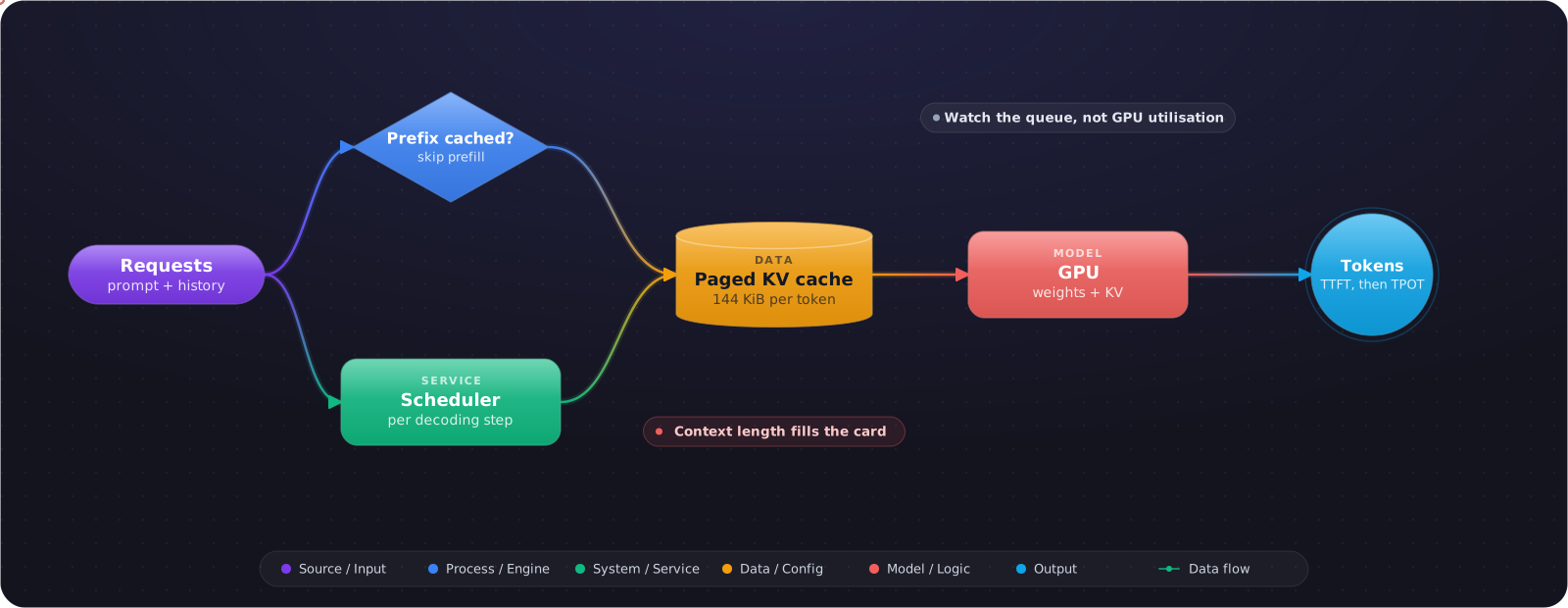
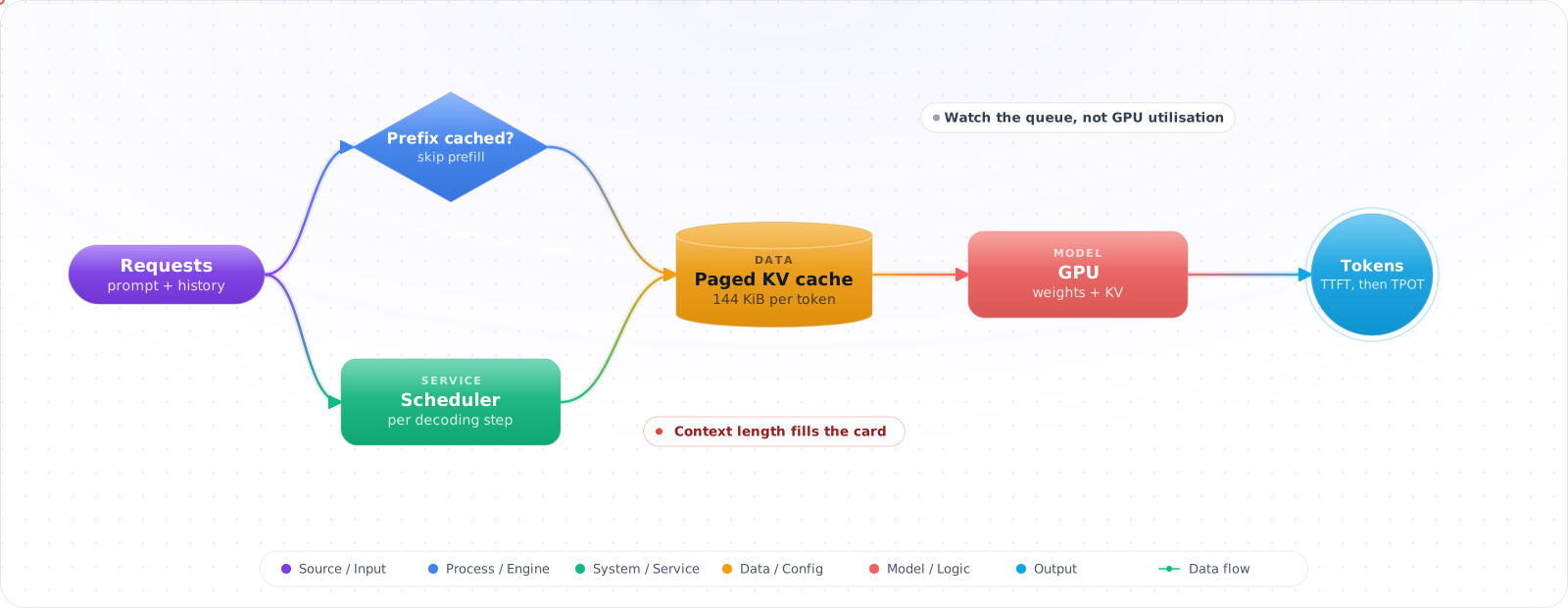
On an 80 GB card, the weights take about a fifth of the memory. What remains, minus activations and runtime overhead, holds the KV cache. Roughly 50 GB of cache is enough for about 340,000 tokens in flight. That is around ten requests if each fills the full 32k context, or well over a hundred short chats of 2,000 tokens. Those are estimates, and the engine prints the real number of cache blocks at startup. The point is that context length, not user count, is what fills the card, so set --max-model-lento what your application needs rather than to the model's maximum.
What vLLM Does With That Memory
PagedAttention: no more reserving for the worst case
The KV cache for each request grows and shrinks as it runs, and the vLLM paper (Kwon et al., SOSP 2023) found that earlier servers wasted much of that memory to fragmentation and duplication, which capped the batch size. Its fix borrows paging from operating systems: the cache is split into fixed-size blocks that are allocated as the sequence grows and can be shared between requests. The authors report near-zero KV waste and 2 to 4 times the throughput of FasterTransformer and Orca at the same latency, with larger gains for longer sequences and bigger models.
Continuous batching: schedule per token, not per request
A static batch waits for its slowest request: short answers can't return and new requests can't join until the whole batch is done. Orca (Yu et al., OSDI 2022) introduced iteration-level scheduling, which runs one decoding step for the whole batch at a time, so finished requests leave and new ones join between steps. vLLM schedules at the same granularity, which is why its batching limits are set per step, and why throughput keeps rising with concurrency until the cache is full.
Prefix caching: pay for a shared prompt once
Automatic prefix caching keeps the KV cache of earlier requests so a new request with the same prefix skips computing it. It fits long system prompts, repeated questions over one document, and multi-turn chat, where each turn resends the history. vLLM's documentation is clear about the limit: it speeds up prefill, the processing of the prompt, and does nothing for decoding new tokens. A workload with short prompts and long answers gains little.
flowchart LR
    R["Request<br/>system prompt + history + question"] --> P{"Prefix<br/>blocks cached?"}
    P -->|"yes"| S["Skip prefill<br/>for cached blocks"]
    P -->|"no"| F["Prefill<br/>compute K and V"]
    S --> D["Decode<br/>one token per step"]
    F --> D
    D --> B["Paged KV blocks<br/>shared, allocated on demand"]
A Starting Configuration
Here is what I'd start from for a chat assistant on one GPU, with vLLM 0.32 (October 2026). Each flag maps to the arithmetic above:
vllm serve Qwen/Qwen3-8B \
  --max-model-len 16384 \
  --gpu-memory-utilization 0.92 \
  --max-num-seqs 128 \
  --enable-prefix-caching
--max-model-len 16384caps prompt plus output per request. Halving it from 32k doubles how many long requests fit.--gpu-memory-utilizationis the fraction of GPU memory this instance may use, 0.92 by default in this release. Lower it if anything else shares the card, or startup will fail on memory.--max-num-seqscaps the sequences processed in one step. Too high and long requests get preempted when the cache runs out; too low and the GPU idles.--enable-prefix-cachingturns on automatic prefix caching. Keep your system prompt byte-for-byte stable, or the prefix never matches.
Flags change between releases, and this project ships every couple of weeks. Check vllm serve --help against the version you deploy rather than trusting a blog post, including this one.
Quantization: Memory Back, Measured Carefully
Quantization stores weights, and optionally activations and the KV cache, in fewer bits. vLLM's FP8 documentation describes a 2x reduction in model memory and up to 1.6x higher throughput with minimal accuracy impact for FP8 weights and activations (W8A8). The hardware matters: FP8 compute needs compute capability 8.9 or higher, meaning Ada Lovelace, Hopper or Blackwell. Turing and Ampere cards can still load FP8 weights, but only as weight-only quantization.
Two separate decisions hide in here. Quantizing the weights frees memory that becomes KV cache, so more requests fit. Quantizing the KV cache itself (--kv-cache-dtype fp8) halves the bytes per token in the formula above. Both cost some accuracy, and the amount depends on the model and the task. Run your own evaluation set before and after, because "minimal impact" on a public benchmark says little about your prompts.
Speculative Decoding: For Latency, Not Throughput
Generating tokens one at a time leaves the GPU waiting on memory. Speculative decoding (Leviathan et al., 2023) lets a cheap proposer guess several tokens ahead, and the large model checks them all in one pass, keeping the ones it agrees with. With the standard rejection sampler the output distribution is unchanged. vLLM's documentation describes it as theoretically lossless up to floating-point precision, and validates its implementation against that. The original paper measured 2 to 3 times faster decoding on T5-XXL with identical outputs.
vllm serve <target-model> \
  --speculative-config '{"method": "draft_model", "model": "<draft-model>", "num_speculative_tokens": 5}'
The catch is in vLLM's own description: it reduces inter-token latency for medium-to-low request rates on memory-bound workloads. At high load the GPU is already busy, and verifying guesses competes with real requests. Model-based proposers such as EAGLE or a model's native multi-token prediction give the largest latency gains, while n-gram and suffix methods give smaller ones without adding load at peak. Turn it on for an interactive product with modest traffic, measure inter-token latency, and turn it off if your peak-hour throughput drops.
The Metrics That Tell You Which Limit You Hit
vLLM exposes Prometheus metrics on /metrics. Five of them answer most capacity questions:
| Metric | What it tells you |
|---|---|
vllm:num_requests_waiting | Requests queued but not running. Rising while the GPU is busy means you are out of capacity. |
vllm:kv_cache_usage_perc | Fraction of KV blocks in use, from 0 to 1. Near 1 with a growing queue means memory is the limit. |
vllm:time_to_first_token_seconds | Queueing plus prefill. What users feel as "is it thinking?" |
vllm:request_time_per_output_token_seconds | Per-request decode speed. The number speculative decoding should improve. |
vllm:prefix_cache_hits / vllm:prefix_cache_queries | Prefix cache hit rate. Near zero means your prompts don't share a stable prefix. |
Read them together. High cache usage with a long queue and slow first tokens means you need more KV memory: a shorter max length, quantization, or another replica. Low cache usage with slow tokens points at compute or at a batch cap set too low. Feed the same latency numbers into your LLM monitoring so they sit next to cost and quality.
Should You Self-Host at All?
This is opinion, so weigh it as such. Self-hosting makes sense when you have steady, high volume on a model small enough for your hardware, data that can't leave your network, or a fine-tuned model no provider will host. It is a bad trade for spiky traffic, because an idle GPU costs the same as a busy one, and for workloads that need the strongest frontier models, which you can't run yourself. Do the token economics with your real traffic shape, including the hours the card sits idle, before you sign a GPU reservation.
What Goes Wrong
1. Serving the model's full context by default
A 128k limit nobody uses shrinks how many requests fit. Set the max length from your real prompt and output sizes.
2. Load testing with one prompt
The same prompt repeated hits the prefix cache every time and makes the server look far faster than it is. Replay a sample of real prompts with real lengths.
3. Watching GPU utilisation
Utilisation reads high whether the card is doing useful work or stalling on memory. Watch the queue and KV cache usage instead.
4. A system prompt with a timestamp at the top
Anything that changes per request near the start of the prompt breaks prefix caching for everything after it. Put variable parts last.
5. Upgrading the engine without re-running evals
Kernel, scheduler and quantization changes between releases can shift outputs and latency. Pin the version, and treat an upgrade like any other change: benchmark and evaluate before you roll it out.