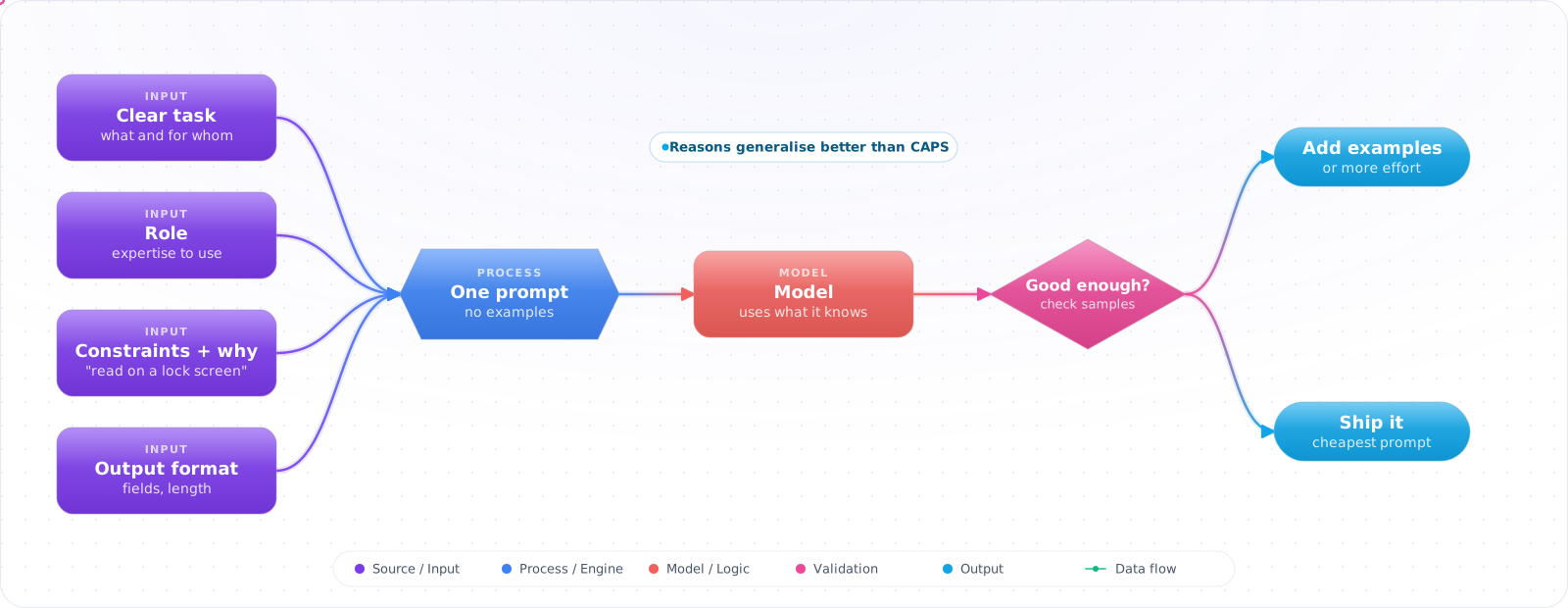
Start by Just Asking
For a one-off question, just ask. The care below is for a prompt that runs many times, where a vague instruction shows up as mediocre results on every call.
The first prompt most people write is one line: "Classify this message." The results are mediocre, and the usual next step is to start collecting examples, or to start talking about fine-tuning.
Usually neither is needed yet. Most poor zero-shot results come from instructions that leave the model guessing: what the labels mean, what to do with a message that fits two of them, what the answer is for. A specific instruction gets you most of the way on most tasks, and it is the cheapest setup you will ever run. Below is what "specific" means in practice, and how to tell when you really have outgrown zero-shot.
- You get mediocre results from vague prompts and reach immediately for few-shot as a fix
- Your prompt says “summarize this” and you're surprised when the length and format vary
- You use role prompting (“You are an expert...”) without understanding what it actually changes
Most tasks that look like they need examples actually need better instruction clarity — and zero-shot is cheaper and more maintainable.
How Zero-Shot Works
flowchart LR
    pretraining["Pretraining
Text prediction on web-scale data
Implicit patterns for many tasks"]
    instruct["Instruction and preference tuning
Instruction-response pairs (SFT)
then preference tuning (RLHF, DPO)"]
    zeroShot["Zero-shot inference
Task description → completion
No examples needed"]

    pretraining --> instruct --> zeroShot
Instruction Clarity
// The most impactful zero-shot improvement: specificity

// ❌ Vague — model has too many valid interpretations
const vaguePrompt = "Summarize this article.";

// ✅ Specific — format, length, and audience are all constrained
const clearPrompt = `
Summarize the following article in exactly 3 bullet points.
Each bullet point should be 1 sentence, max 20 words.
Target audience: non-technical product managers.
Focus on business impact, not technical details.

Article:
${articleText}
`;

// What to specify:
// - Output format (bullet points, numbered list, JSON, prose)
// - Output length (3 bullets, 100 words, one paragraph)
// - Target audience (engineers, executives, customers)
// - Perspective/focus (business impact, technical approach, risks)
// - What to exclude ("no technical jargon", "do not include introductory phrases")Check it: Hand your prompt to a colleague with no other context, and write down every question they ask. The model had the same questions.
Role Prompting
Assigning a role adjusts the model's register (vocabulary, depth, assumptions about what you know) and can activate relevant knowledge clusters from pretraining. It's not magic — a role doesn't give the model capabilities it doesn't have — but it does shift output style meaningfully.
// Role prompting via system message
const systemPrompt = `You are a senior software engineer reviewing a code change for production readiness.

Your review focuses on:
- Security vulnerabilities (OWASP Top 10)
- Performance implications at scale
- Error handling and edge cases
- Backward compatibility

You do not comment on style or formatting unless it affects readability.
Your tone is direct and technical. You cite specific line numbers.`;

const response = await openai.chat.completions.create({
  model: 'gpt-6.1-sol',
  messages: [
    { role: 'system', content: systemPrompt },
    { role: 'user', content: `Review this code:\n\n${codeChange}` }
  ]
});

// Role effects:
// - Shifts vocabulary and assumed expertise level
// - Activates relevant knowledge structures from pretraining
// - Sets tone (formal/informal, direct/diplomatic)
// - Constrains scope (what to include/exclude in the response)

// Roles that work well: "senior [role]", "expert in [domain]", "[role] specialising in [area]"
// Roles that don't help: "a helpful assistant", "an AI", vague personas
Zero-Shot Chain-of-Thought
Adding “Let's think step by step” improves accuracy on reasoning tasks. Kojima et al. (2022) showed it raised text-davinci-002 from 17.7% to 78.7% on MultiArith and from 10.4% to 40.7% on GSM8K. This is the zero-shot version of chain-of-thought prompting — no examples needed, just the instruction to reason before answering. On models that already reason internally, the effort setting does this job instead (see below).
// Zero-shot CoT for reasoning tasks
const withoutCoT = `
A customer's subscription started on March 15. They cancelled after 47 days.
Their plan costs $29/month. They paid monthly. How much should they be refunded?
`;

const withCoT = `
A customer's subscription started on March 15. They cancelled after 47 days.
Their plan costs $29/month. They paid monthly. How much should they be refunded?

Think through this step by step before giving your final answer.
`;

// withCoT is significantly more likely to get the right answer
// because it forces the model to surface its reasoning

// For production: extract just the final answer
const finalAnswerPrompt = `...(calculation prompt)...

Think step by step. Then give ONLY the final dollar amount refund on the last line,
formatted as: REFUND: $XX.XX`;
Format Specification
// Specify output format explicitly — don't let the model choose
const structuredPrompt = `
Analyse the sentiment of the following customer review.

Return your analysis as a JSON object with this exact structure:
{
  "sentiment": "positive" | "negative" | "neutral" | "mixed",
  "confidence": 0.0 to 1.0,
  "key_phrases": ["phrase1", "phrase2"],  // up to 3 phrases driving the sentiment
  "summary": "one sentence"
}

Return ONLY the JSON object. No explanation, no markdown code blocks.

Review: ${reviewText}
`;

// Or use structured outputs, which enforce the schema rather than just valid JSON:
const response = await openai.chat.completions.create({
  model: 'gpt-6-luna', reasoning_effort: 'none',
  messages: [{ role: 'user', content: structuredPrompt }],
  response_format: {
    type: 'json_schema',
    json_schema: {
      name: 'review_sentiment',
      strict: true,
      schema: {
        type: 'object',
        properties: {
          sentiment: { type: 'string', enum: ['positive', 'negative', 'neutral', 'mixed'] },
          confidence: { type: 'number' },
          key_phrases: { type: 'array', items: { type: 'string' } },
          summary: { type: 'string' },
        },
        required: ['sentiment', 'confidence', 'key_phrases', 'summary'],
        additionalProperties: false,
      },
    },
  },
});Check it: Run the same input ten times and compare the shape of the outputs. They should match.
When to Upgrade from Zero-Shot
- Consistent bad format: Switch to few-shot with format examples, or use structured output
- Task-specific style not matching: Provide 2-3 examples of your exact style
- Factual errors on specialised domain: Add context via RAG or switch to a domain-specific model
- Reasoning errors on multi-step problems: Add explicit chain-of-thought instruction or raise the reasoning effort (current GPT and Claude models reason natively)
- High volume, cost concerns: Fine-tune on your zero-shot prompts + ideal outputs
Zero-Shot on Reasoning Models: Effort Is the New Knob
On a model that reasons before it answers, the zero-shot prompt does less of the work and the effort setting does more. The instruction still has to say what you want. How hard the model thinks about it is now a request parameter rather than a phrase in the prompt.
- Describe the outcome, not the procedure. Step-by-step scripts written for older models often make results worse on current ones, because the model follows your steps instead of finding a better route. State the goal, the constraints, and what a good answer looks like.
- Tune effort per route. Classification, extraction and routing usually do well at low effort. Multi-step analysis and coding respond to higher effort. Measure on real requests before raising a default, because higher effort costs latency and output tokens.
- Give the reason behind a rule. "Keep answers under 80 words because they are read on a phone lock screen" generalises better than "MAX 80 WORDS". Capitals and repeated warnings were a workaround for weaker instruction following.
- Drop the role when it adds nothing. "You are a world-class expert" no longer moves quality. A role is still useful when it carries real context, such as who the reader is or what the model is allowed to do.
Check it: Run your eval set at two effort levels. Note the change in quality, latency and output tokens.
Pitfalls
Negation and exclusions
LLMs are worse at following negative instructions than positive ones. “Do not include technical jargon” is less reliable than “Use plain language suitable for a non-technical reader.” Rephrase exclusions as positive constraints wherever possible.
Role prompting on factual tasks
Telling the model it's “an expert in quantum physics” does not give it knowledge it doesn't have. Zheng et al. (2023) tested 162 personas on 2,410 factual questions and found that adding a persona did not improve accuracy over no persona. If a role makes the answer sound more confident without making it more correct, that is worse than no role at all.
Try It on Your Own System This Week
Three checks on a prompt you already run, about an hour in total:
- Count the rules that say never or do not. Rewrite each one as what you want instead.
- Give it an input where the right answer is that there is none. It should say so, in a form your code can branch on.
- Remove the role line and re-run your evals. If nothing changes, it was adding nothing.
Getting More From a Plain Prompt
With current models, a clear zero-shot prompt goes much further than it used to. Before you add examples, chains or frameworks, make sure the plain version has had a fair chance. The most common reason a zero-shot prompt fails is that it's missing context a human colleague would have asked for.
Try this test: hand your prompt to a new colleague with no other context. Would they know who the output is for, what it will be used for, what good looks like, and what to do with an edge case? If they would have questions, so does the model. Add the reason behind a rule as well. "Keep it under 50 words" works, but "keep it under 50 words because it's shown in a mobile notification" works better, since the model can then make sensible choices you didn't anticipate.
Say what to do, not only what to avoid
Instructions that describe the desired result usually beat lists of prohibitions. "Write in plain paragraphs" tends to work better than "don't use bullet points". Long lists of "never" rules can also backfire by making the unwanted thing more salient. Keep the few hard rules that really matter, and state them once.
Structure helps once a prompt gets long. Separate instructions, context and input clearly, with XML tags or headers, so the model doesn't confuse your document with your request. Put long documents before the question, and tell the model what to do if the answer isn't in them.
Ask for uncertainty
A zero-shot prompt with no way out will produce an answer even when it shouldn't. Tell the model what to do when it doesn't know, for instance: "If the document doesn't say, reply NOT_FOUND." This single line removes a lot of hallucination from extraction work, and it gives your code something to branch on.
Matching the prompt to the model
Prompts are less portable than they look. Claude tends to follow instructions very literally, GPT reasoning models favour a clear goal over step-by-step micromanagement, and Gemini handles long multimodal context well. A prompt tuned on one may need adjusting for another, so test on the model you will actually ship. Check effort settings too, because on a reasoning model a prompt that fails at low effort may be fine at medium, and that's a config change rather than a prompt problem.
When a plain prompt really isn't enough, move up one step at a time: examples first, then chained steps. Each step adds cost and maintenance, so make sure your evals show that it's worth it.