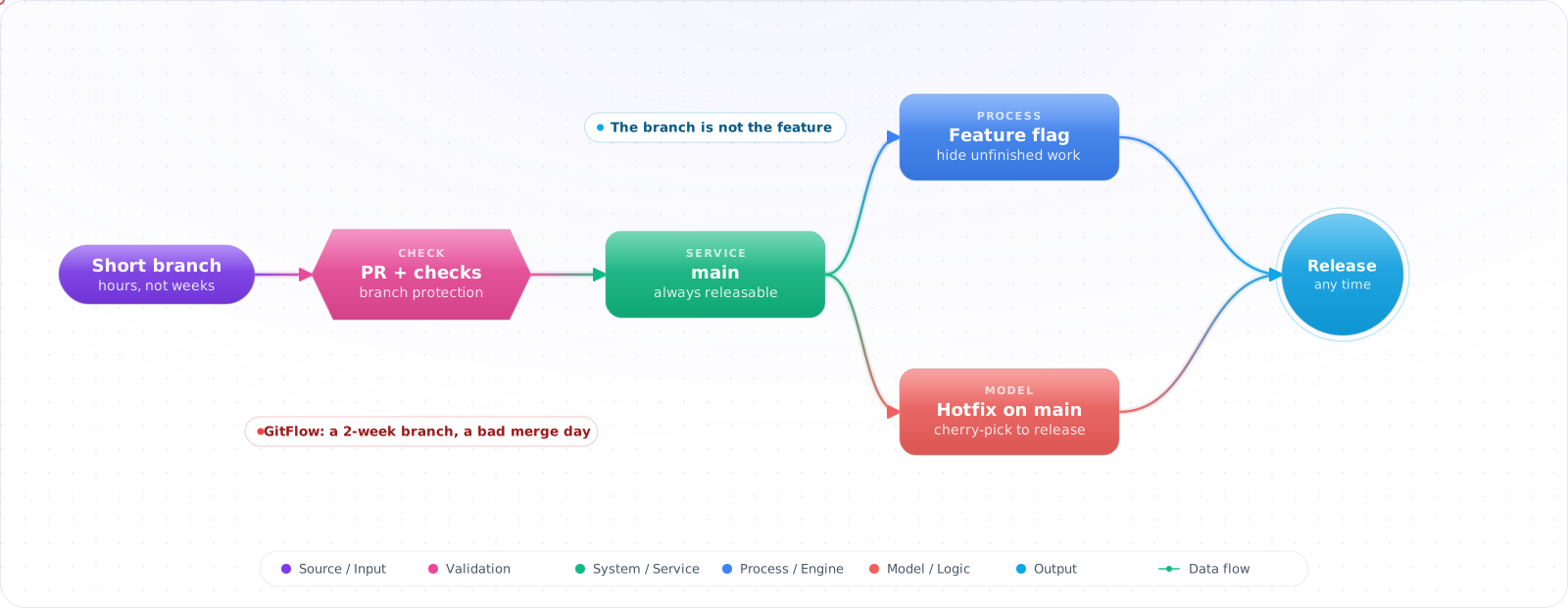
Start by Committing to Main
With one or two developers, committing straight to main is fine, and a branching strategy would be ceremony. You need one when several people change the same code every day and some of the work takes weeks to finish.
Most branching strategy debates are actually feature flag debates in disguise. The real question is: how do you ship code that's in progress without it breaking production? The answer is almost never “more branches” — it's separating deployment from release. Below are the main strategies and the kind of team each one fits.
- Your main branch has a 2-week-old feature branch diverging from it and someone's about to have a bad merge day
- You use GitFlow because you read about it in 2018 and never questioned it
- Every PR requires a “rebase on main” step that takes 30 minutes
- Your “release branch” is permanently behind main but everyone's afraid to delete it
Trunk-based development with feature flags lets a large team merge every day, without a painful merge at the end of every feature.
Trunk-Based Development
Everyone commits to main (the trunk) directly, or via short-lived branches that live <2 days. Continuous integration is the literal definition: code is always integrated. You ship behind feature flags, not behind branches.
gitGraph
    commit id: "fix: input validation"
    branch feature/payment-v2
    commit id: "feat: payment behind flag"
    checkout main
    merge feature/payment-v2 id: "merge (1 day old)"
    commit id: "fix: typo"
    commit id: "chore: deps update"
    branch fix/auth-edge-case
    commit id: "fix: token refresh"
    checkout main
    merge fix/auth-edge-case id: "merge (4 hours old)"
// Feature flag approach — ship incomplete code safely
// The flag controls visibility, not deployment

import { isFeatureEnabled } from '@/lib/flags';

export async function getCheckoutFlow(userId: string) {
  const useNewPaymentFlow = await isFeatureEnabled('payment-v2', { userId });

  if (useNewPaymentFlow) {
    return newPaymentFlow(); // In development — only internal users see this
  }
  return legacyPaymentFlow(); // Everyone else
}

// Flags can be:
// - Static (env var: PAYMENT_V2_ENABLED=true)
// - User-based (LaunchDarkly, GrowthBook, Unleash)
// - Percentage rollout (5% → 25% → 100%)
// - Kill switch (disable instantly if metrics degrade)Check it: List your open branches by age. Anything older than a couple of days is drifting from main, and the merge gets harder every day it waits.
GitFlow
GitFlow uses long-lived branches: main, develop, feature/*, release/*,hotfix/*. It was designed for versioned software with scheduled releases — desktop apps, SDKs, firmware. For continuously-deployed web services, it adds coordination overhead without the benefits.
# GitFlow branch structure
main          ─────────────────────────────────────────────────────▶
                    ↑ (merge from release/1.2.0)    ↑ (hotfix)
release/1.2.0       ──────────────────────────
develop       ─────────────────────────────────────────────────────▶
                  ↑ (merged features)
feature/A         ────────
feature/B               ──────────────

# When GitFlow makes sense:
# - Versioned libraries (npm packages, SDKs)
# - Mobile apps with App Store review cycles
# - Enterprise software with quarterly releases
# - Regulated software requiring audit trails per version

# When it doesn't:
# - SaaS web applications (continuously deployed)
# - Internal tools
# - Any team deploying more than once per week
Merge Strategies
# Three merge strategies — each has different implications for git history

# 1. Merge commit — preserves full branch history
git merge feature/my-feature
# Result: creates a merge commit, full history visible
# Pro: complete context
# Con: noisy history with many small commits

# 2. Squash merge — one commit per feature
git merge --squash feature/my-feature
git commit -m "feat: add payment v2 flow (#123)"
# Result: single commit on main
# Pro: clean linear history
# Con: individual commits lost, so bisect stops at the whole PR

# 3. Rebase — replay commits on top of main
git rebase main feature/my-feature
git checkout main && git merge feature/my-feature
# Result: linear history, no merge commits
# Pro: clean history, each commit meaningful
# Con: rewrites SHA — problematic for shared branches

# Recommendation for trunk-based development:
# Use squash merge for feature branches (clean main history)
# Use conventional commits format for PR titles:
# feat: user authentication (#145)
# fix: token expiry edge case (#146)
# chore: upgrade to Node 20 (#147)
Branch Protection Rules
# Illustrative summary of the settings, not a real config file
# Settings > Branches > Branch protection rules > main

branch_protection_rule:
  pattern: "main"
  requires:
    - status_checks:
        - ci/lint-typecheck
        - ci/test
        - ci/build
      # These must be green before merge

    - pull_request_reviews:
        required: 1          # At least 1 approval
        dismiss_stale: true  # Re-approve after new pushes

    - linear_history: true   # Enforce squash or rebase — no merge commits

    - no_force_push: true
- deletion_protected: trueCheck it: Try to push directly to main, and to merge a pull request with a failing check. Both should be refused, for administrators too.
Handling Hotfixes in Trunk-Based Development
# In trunk-based development, hotfixes go through the same process
# but can be fast-tracked:

# 1. Create a short-lived branch from main (which IS production)
git checkout -b fix/critical-auth-bypass main

# 2. Apply fix, test locally
git commit -m "fix: prevent token reuse after logout (#emergency)"

# 3. PR with emergency label — triggers expedited review
# CI still runs (non-negotiable — hotfixes cause incidents too)

# 4. Squash merge to main → auto-deploys to production
# No cherry-picking needed — main IS the release branch

# vs GitFlow hotfix (more complex):
# git checkout -b hotfix/1.2.1 main
# ... fix ...
# merge to main AND to develop AND to release/1.2.0
# tag 1.2.1
# (several merges for one fix)
Keeping Main Green at Speed
Feature flags let unfinished work merge early. Two more techniques handle the problems that appear once many people are merging small changes into the same branch all day.
- Merge queues. Two pull requests can each pass on their own and fail together. A merge queue tests every change on top of the ones ahead of it and merges only what passes, so main is never the place where the conflict is discovered.
- Branch by abstraction. For a change too large to hide behind one flag, such as replacing a data layer, introduce an interface, build the new implementation next to the old one on main, move callers across in small steps, then delete the old code. Every step is releasable.
Both depend on a fast pipeline. A merge queue with a forty-minute build becomes a queue in the ordinary sense, and people start batching changes to avoid it, which brings back the large merges trunk-based development was meant to remove.
Check it: Count how often main was red last month, and how long it stayed red. With a merge queue and a fast pipeline, both numbers should be small.
Try It on Your Own System This Week
Three checks on a repository several people work in, about an hour in total:
- Sort your branches by age. The oldest is your next painful merge.
- List your feature flags, and when each was last changed. One that has been fully on for months should be deleted.
- Time your pipeline. Trunk-based work depends on it being fast and reliable. Fix that before you change how you branch.
Pitfalls
Feature flags without cleanup
Every feature flag is technical debt. Flags that never get removed become permanent conditional paths that nobody fully understands. Create a ticket to remove every flag when you create it. Set a calendar reminder. A flag that has been fully on for months is usually dead code waiting to cause a bug.
Trunk-based without CI
Trunk-based development only works if your CI pipeline is fast and reliable. Committing to trunk frequently with a slow or flaky CI means you're constantly breaking the build for everyone. Fix the pipeline before adopting TBD.
Long-lived feature branches in TBD
A “feature branch” that lives for 2 weeks is not trunk-based development — it's waterfall with extra steps. If a feature is too big to ship in 1-2 days, decompose it. Ship the data model, then the API, then the UI, all behind a feature flag that only enables the complete experience.
Branching When Agents Open the Pull Requests
Coding agents have put new pressure on branching. A team can now produce far more pull requests than it can review, and long-lived branches conflict with each other faster. That strengthens the case for trunk-based development. Keep branches short and pull requests small, and have each one do a single thing.
Parallel agents work best with git worktree, which gives each agent its own checkout of its own branch. Keep agent branches away from each other by assigning tasks that touch different files. If two agents edit the same module, you get merge conflicts that cost more to resolve than the work saved.
Protect main the same way for everyone, agent or human: required reviews, passing checks, and no direct pushes. An agent's token should never be able to bypass branch protection. Give it the smallest scope that works, ideally a GitHub App token limited to the repository, which expires quickly.
Feature flags make trunk work
The main objection to trunk-based development is unfinished work. Feature flags answer that. Merge code behind a flag that's off, and turn it on when it's ready, for a small group first. You separate deploy from release, so rollback is a flag flip rather than a revert. The cost is flag debt. Every flag needs an owner and a removal date, because old flags turn into a maze of untested code paths.
Merge queues
On a busy repository, two pull requests can each pass CI and break main once combined. A merge queue tests each change against the latest main, plus whatever is ahead of it in the queue, before merging. GitHub offers this natively, and it's worth enabling when you have more than a few merges an hour, which agents can easily produce.
Conventional commits and history
Squash merging keeps main readable, with one commit per pull request. That also makes git revert and git bisect far more useful. Use a clear commit format so that changelogs and version bumps can be generated automatically. Ask agents to follow it too, by putting it in your AGENTS.md. When a bad merge does land, revert first and debug afterwards. Protecting the team's ability to ship matters more than getting the fix right on the first try.