Start With a Mutable Tag on Your Own Machine
On your own machine, a mutable tag such as latest is convenient, and nothing depends on it. The rules below start to matter when a cluster pulls the image, because from then on a tag that can move means you no longer know what's running.
A container registry is the boring critical path between your build and your runtime. The wrong choice — or the wrong configuration — shows up as failed deploys, surprise egress bills, slow cold starts, and supply-chain CVEs that ship straight to production. The choice is also sticky: image layers, automation, retention policies, and signing all couple deeply.
- Your pull latency spikes during incidents and you don't know why
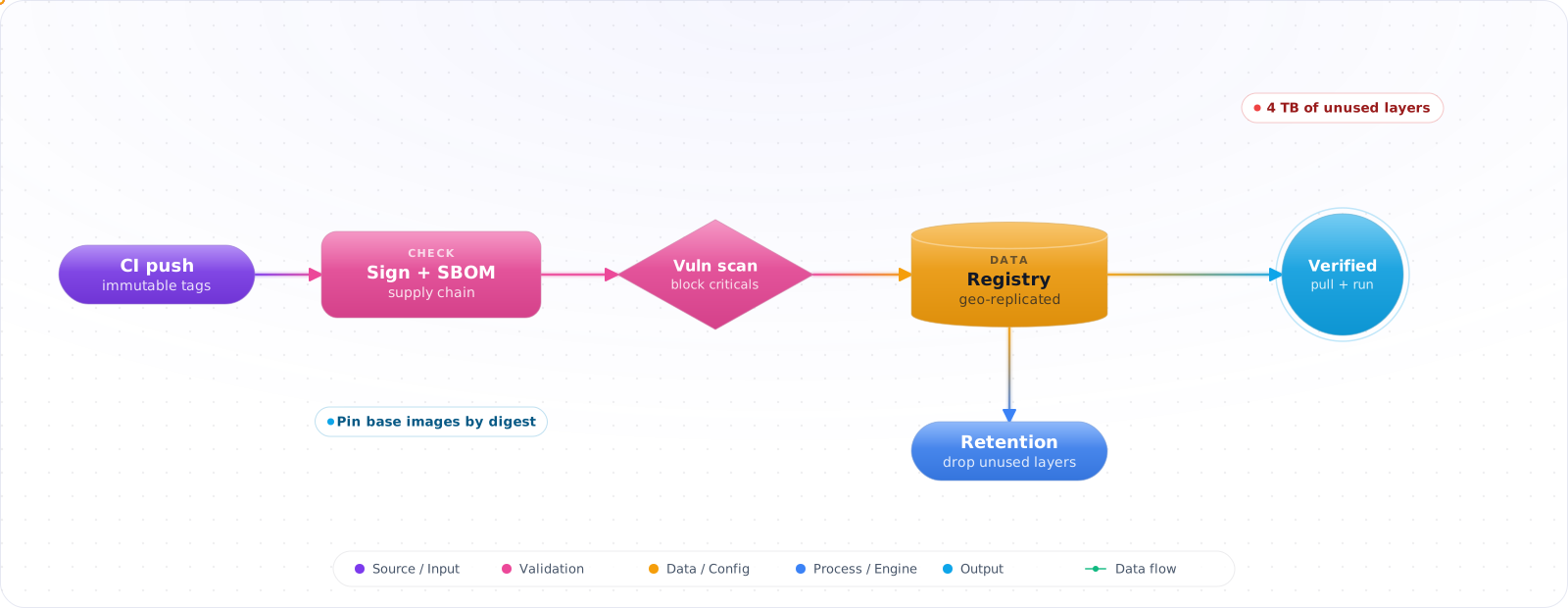
- You have 4 TB of unused image layers and no retention policy
- You can't answer "is this image signed and scanned?" on demand
The 2026 Landscape
- Azure Container Registry (ACR) — Azure-native, geo-replication, ACR Tasks for build automation, vulnerability scanning via Microsoft Defender for Containers.
- Amazon ECR — AWS-native, replication, lifecycle policies, ECR scanning (Inspector).
- GitHub Container Registry (GHCR) — tight CI/CD integration with Actions, free for public images, signing via Sigstore.
- Google Artifact Registry — successor to GCR; multi-format (containers, npm, maven), Binary Authorization integration.
- Docker Hub — fine for OSS, painful rate limits for production pulls without paid plans.
- Self-hosted (Harbor, Zot, Distribution) — when air-gapped or sovereignty matters.
Picking One (Decision Matrix)
- Same cloud as runtime? Use that cloud's registry, in the same region — pulls stay on the provider's network and avoid cross-region transfer charges.
- Multi-cloud or hybrid? GHCR or Harbor centrally + replicate to each runtime cloud.
- Regulated / air-gapped? Harbor or Zot on-prem with mirrored upstream.
- Cost driver? Egress dominates; co-locate registry with runtime.
flowchart LR
    CI[GitHub Actions /<br/>Azure DevOps] -->|build + sign| R[(Registry)]
    R --> SC[Scan: Trivy / Defender]
    SC -->|pass| PR[Policy admit:<br/>signed + scanned]
    PR --> K[Kubernetes / ACA / ECS]
    R -. replicate .-> R2[(Registry replica<br/>per region)]
Layer Hygiene Is Half the Battle
- Order Dockerfile steps from least- to most-frequently-changed; bust caches as late as possible.
- Use multi-stage builds; ship runtime-only images (no compilers).
- Pick a small base (distroless, alpine, chainguard) — smaller images pull faster and have fewer CVEs.
- Pin base images by digest (
FROM ubuntu@sha256:...) in production builds.
Tagging Strategy
# Recommended tags per push
sha-3f2a9c8                # immutable, what you actually deploy
2026.05.17-build.412       # human-readable, sortable
feature-payments-v2        # PR/branch tags for staging
latest                     # ONLY for OSS / docs / never in prod manifests
Prod manifests reference the digest (image@sha256:...). Mutable tags are convenient and dangerous.
Check it: Open a production manifest and look at the image reference. It should end in a digest. Then try to push over an existing release tag. With immutability on, the registry should refuse.
Retention & Garbage Collection
Layer storage grows silently. Lifecycle rules to set on day one:
- Untagged manifests: delete after 7 days.
- Feature/PR tags: delete after 30 days.
- Production digest pins: keep forever (or until you can prove no in-flight rollback target needs them).
- Run garbage collection on a schedule; ACR/ECR offer policy-driven GC.
Supply Chain: Sign, Scan, Verify
- Sign with Sigstore Cosign or Notation. Keyless via OIDC is the default in 2026.
- Scan on push (Trivy, Grype, ECR/ACR managed). Block high/critical on production tags.
- SBOM attached as a signed attestation (
cosign attest --type spdxjson;cosign attach sbomis deprecated). Required by many enterprise procurement teams. - Verify at admission — Kyverno or OPA Gatekeeper enforces "only signed, scanned images from approved registries".
Check it: Try to deploy an unsigned image to a test cluster. The admission controller should reject it, with a message that says why.
Pull Performance
- Geo-replicate to the regions your runtime is in. Cross-region pulls add seconds to cold starts.
- Enable pull-through cache on Kubernetes nodes (containerd
registry mirror). - For very large images, consider lazy-pulling formats (eStargz, SOCI on AWS) — start before the image is fully pulled.
Check it: Time a pull of your largest image on a fresh node in each region you run in. The slow ones are pulling across regions.
Failure Modes
- Docker Hub rate limits — anonymous pulls throttle at 100/6h per IP. Mirror to your own registry.
- Cross-region pulls in prod — invisible until you scale and the egress bill arrives.
- Mutable tags in prod manifests — "works on my cluster" mysteries; pin to digest.
- No retention policy — quietly accumulates terabytes; one day your CI breaks because the registry is full.
Try It on Your Own System This Week
Three checks on a registry you already use, about an hour in total:
- Search your manifests for mutable tags. Each one is a deployment you can't reproduce.
- Check how much the registry stores, and when it last removed anything. No retention policy means it only ever grows.
- Count the pulls from public registries in production. Each is someone else's rate limit, and someone else's outage.
Production Checklist
- Registry in the same cloud/region as runtime; geo-replicate for multi-region.
- Sign + scan + SBOM on every push; verify at admission.
- Pin to digest in prod manifests; lifecycle policy for everything else.
- Pull-through cache or mirror for Docker Hub to dodge rate limits.
- Monitor pull latency p95 as an SLI for deploy health.
Signing and What Runs in Production
A registry tells you what's stored. It doesn't tell you whether an image should run. Close that gap by signing images in CI, and verifying the signature at deploy time. Cosign with keyless signing uses your CI's OIDC identity, so you have no private key to manage, and the signature records exactly which workflow built the image:
cosign sign --yes ghcr.io/acme/api@sha256:abc123
cosign verify ghcr.io/acme/api@sha256:abc123 \
  --certificate-identity-regexp "https://github.com/acme/.*" \
  --certificate-oidc-issuer https://token.actions.githubusercontent.com
Then enforce it in the cluster with an admission controller such as Kyverno or Sigstore's policy-controller. Unsigned images, or images signed by the wrong workflow, simply don't run. This stops the most common supply-chain shortcut, where somebody pushes an image by hand during an incident and it stays forever.
Always deploy by digest. A tag like v1.4 can be overwritten, whereas a digest can't. Turn on tag immutability in your registry too, if it's supported. It's a small setting that stops a whole category of confusion.
SBOMs and scanning
Attach an SBOM to each image with syft or BuildKit's --sbom=true flag, then scan with Trivy or Grype. Scan continuously rather than only at build time, because a CVE published next week affects an image you built last week. A registry with built-in scanning makes this easier. Focus on exploitable, fixable vulnerabilities in what's actually loaded, or your team will drown in noise.
Pull-through caches and rate limits
Pulling from public registries in production is a reliability risk, since rate limits and outages become your outage. Configure a pull-through cache, so that images get pulled once and are served from your own registry. It's faster, it saves egress, and your deployments keep working when Docker Hub has a bad day. It's also a good place to enforce an allowlist of base images.
Keep costs under control as well. Retention rules should remove untagged layers and old builds, while keeping anything still running. Check what's deployed before you delete, because a cleanup job that removes a running image's digest will fail the next time a node has to pull it.
Key Takeaways
- Co-locate the registry with your runtime; egress and latency are the real costs.
- Sign, scan, SBOM, admission — supply chain is a four-step pipeline, not a checkbox.
- Lifecycle policies and digest pinning prevent the slow-motion failures registries are infamous for.