Start With a Direct Tool Call
For a single tool and a straightforward question, call the tool directly. It's faster, and just as accurate. The loop below is for tasks that need several calls, where each one depends on what the last one returned.
An agent with tools but no visible reasoning works until it does not. Then you open the logs and find a list of tool calls with no explanation: why it checked that warehouse, why it called the same API four times, why it stopped where it did.
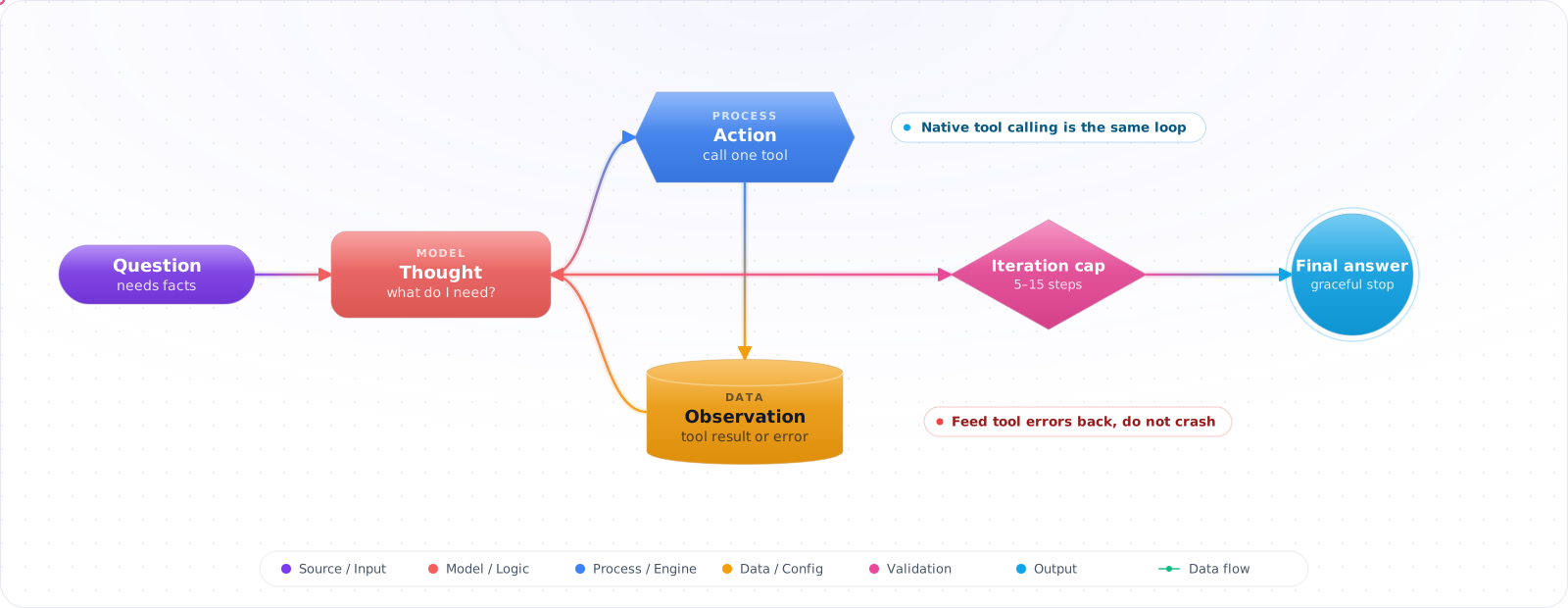
ReAct fixes that by alternating a short thought, one action and the observation that comes back, until the model has enough to answer. The reasoning keeps multi-step tasks on track and leaves a readable trail of every decision. Today the actions are usually native tool calls rather than parsed text, but the loop is the same, and so are the ways it goes wrong.
- Your agent jumps directly to tool calls without reasoning about which tool is appropriate
- You have multi-step tasks that require querying state before deciding the next step
- Your agent gets stuck in loops or calls the wrong tool for the task
- You're trying to understand why an agent made a specific decision
Explicit reasoning traces make agent decisions interpretable and debuggable. In the ReAct paper they also raised success on interactive multi-step tasks such as ALFWorld (71% vs 45% for acting alone).
The ReAct Loop
sequenceDiagram
    participant Model
    participant Tools

    Note over Model: User: "What's the total order value for customer C-100 this quarter?"

    Model->>Model: Thought: I need to get customer orders. I'll search by customer ID and date range.
    Model->>Tools: Action: searchOrders({customerId: "C-100", dateFrom: "2025-01-01"})
    Tools->>Model: Observation: [{id: 123, amount: 450}, {id: 124, amount: 890}]

    Model->>Model: Thought: I have 2 orders totaling $1340. That answers the question.
    Note over Model: Final Answer: "Customer C-100 has 2 orders this quarter totaling $1,340."
Check it: Open the log of one multi-step run. For each tool call, you should be able to read why it was made.
ReAct Prompt Structure
// Few-shot ReAct examples teach the model the Thought/Action/Observation pattern
const systemPrompt = `You are an order management agent. You help users query and manage orders.

You have access to these tools:
- searchOrders(customerId?, dateFrom?, dateTo?, minAmount?): Search orders
- getCustomer(customerId): Get customer profile
- getOrderDetails(orderId): Get full order with line items

Always follow this format:
Thought: [your reasoning about what to do next]
Action: [tool name and arguments as JSON]
Observation: [result will appear here]
... (repeat as needed)
Final Answer: [your response to the user]

Example:
User: What did customer C-42 order last month?
Thought: I need to search for orders from customer C-42 in the last month.
Action: searchOrders({"customerId": "C-42", "dateFrom": "2025-01-01", "dateTo": "2025-01-31"})
Observation: [{"id": 99, "amount": 250, "status": "delivered", "date": "2025-01-15"}]
Thought: I found one order. I have enough information to answer.
Final Answer: Customer C-42 placed one order last month for $250, delivered on January 15th.`;
Production ReAct Implementation
import OpenAI from 'openai';

const openai = new OpenAI();
const MAX_ITERATIONS = 10;  // Prevent infinite loops

async function runReActAgent(
  userQuestion: string,
  tools: OpenAI.Chat.Completions.ChatCompletionTool[],
  toolHandlers: Record<string, (args: unknown) => Promise<unknown>>
): Promise<string> {
  const messages: OpenAI.Chat.Completions.ChatCompletionMessageParam[] = [
    { role: 'system', content: systemPrompt },
    { role: 'user', content: userQuestion },
  ];

  for (let i = 0; i < MAX_ITERATIONS; i++) {
    const response = await openai.chat.completions.create({
      model: 'gpt-6-luna', reasoning_effort: 'none',
      messages,
      tools,
      tool_choice: 'auto',
    });

    const message = response.choices[0].message;
    messages.push(message);

    // No tool calls = model has enough information for final answer
    if (!message.tool_calls) {
      return message.content ?? '';
    }

    // Execute tool calls and append results
    for (const toolCall of message.tool_calls) {
      let result: unknown;
      if (toolCall.type !== 'function') {
        result = { error: 'Only function tools are supported' };
      } else {
        try {
          const handler = toolHandlers[toolCall.function.name];
          if (!handler) throw new Error('Unknown tool: ' + toolCall.function.name);
          // Malformed JSON arguments land in the catch and go back as an observation
          result = await handler(JSON.parse(toolCall.function.arguments));
        } catch (error) {
          // Return error as observation — model can decide to retry or change approach
          result = { error: (error as Error).message };
        }
      }

      // Send back a result for every call, including failures
      messages.push({
        role: 'tool',
        tool_call_id: toolCall.id,
        content: JSON.stringify(result ?? null),
      });
    }
  }

  // Safety valve: force a final answer if max iterations hit
  const finalResponse = await openai.chat.completions.create({
    model: 'gpt-6-luna', reasoning_effort: 'none',
    messages: [
      ...messages,
      { role: 'user', content: 'Summarise what you found so far and give a final answer.' },
    ],
    tools,
    tool_choice: 'none',  // Force text response
  });

  return finalResponse.choices[0].message.content ?? 'Unable to complete the request.';
}
Handling Tool Errors
// The model can reason about errors and change strategy
// This is a key ReAct advantage over simple tool-calling loops

// Example conversation flow when a tool fails:
//
// Thought: I'll get the order details for order #999
// Action: getOrderDetails({"orderId": "999"})
// Observation: {"error": "Order not found"}
// Thought: Order #999 doesn't exist. The user might have the wrong ID.
//           I'll search for their recent orders instead.
// Action: searchOrders({"customerId": "C-100"})
// Observation: [{"id": 123, ...}, {"id": 456, ...}]
// Thought: I found their actual orders. I can clarify the correct ID.
// Final Answer: "Order #999 wasn't found, but I see your recent orders are #123 and #456..."

// The "return error as observation" pattern enables this reasoning:
try {
  result = await toolHandlers[toolCall.function.name]?.(args);
} catch (error) {
  result = {
    error: (error as Error).message,
    suggestion: 'Check that the ID exists or try a search first',
  };
  // Model sees this as an observation and reasons about next steps
  // vs crashing the loop with an uncaught exception
}Check it: Make one tool return an error and watch the next step. The model should change its approach, and the loop shouldn't crash.
ReAct vs Native Tool Calling
The original ReAct pattern had the model write Thought:, Action: and Observation: as plain text, which your code parsed with regular expressions. Every current provider now offers the same loop natively: the model returns a structured tool call, you run it, and you send back a structured result. The model's own reasoning between calls takes the place of the written thought.
Use native tool calling for anything new. It removes the parsing failures, supports several tool calls in one turn, and lets strict schemas validate the arguments. Text-format ReAct is still the right choice in two cases: a self-hosted model without reliable tool calling, and teaching, because the written trace makes the loop visible.
What does not change is the discipline around the loop. Whichever format you use, you still need a step limit, a way to hand tool errors back to the model as observations instead of crashing, and a rule for what happens when the limit is reached. Those three decisions cause more production incidents than the choice of format.
Pitfalls
No iteration cap
Without a maximum iteration count, a stuck agent calls tools indefinitely — generating cost and latency. SetMAX_ITERATIONS to a reasonable number (5–15 depending on task complexity) and force a graceful conclusion rather than letting the loop run forever.
Ignoring the Thought step
Some implementations strip the Thought traces from the conversation to save tokens. This hurts reasoning quality on complex tasks. Keep Thoughts in the message history during the loop. Strip them only from the final user-facing response if needed.
Using ReAct for simple tasks
ReAct adds latency: each Thought-Action-Observation cycle is an extra LLM call. For single-tool tasks or straightforward queries, direct function calling without the Thought structure is faster and equally accurate. Use ReAct when the task genuinely requires planning across multiple tool calls.
Try It on Your Own System This Week
Three checks on an agent loop you already run, about an hour in total:
- Find the step limit, and what happens when it is reached. The run should return what it has, and say what is missing.
- Look at the size of your largest tool result. Return only what the model needs, and cap it.
- Search a week of runs for the same call made twice in a row. A repeat with the same arguments should stop the loop.
ReAct in the Age of Native Tool Calling
The original ReAct paper taught a model to write "Thought", "Action" and "Observation" as plain text, and your code parsed it. That was a clever workaround for models with no tool API. Every major provider now has native tool calling, so hand-parsing ReAct text is rarely the right choice for a new system. Parsing is fragile, a stray colon can break a run, and you lose structured arguments and parallel calls.
The idea survives, though. Reason, act, observe, repeat is still how every agent loop works. What changed is who does each part. The provider's API carries the action, your code runs the tool and returns the observation, and on a reasoning model the thinking happens internally. So the loop is the same, and most of the prompt scaffolding has gone.
What to do with the Thought step
On a reasoning model, asking for an explicit "Thought:" line tends to duplicate work the model has already done, and you pay for it twice. Set reasoning effort instead, and let the model think. If you need an audit trail, ask for a short reason as a field on the tool call, something like reason: "checking the invoice before refunding". It costs a few tokens, and it makes traces far easier to read.
Keep the explicit text pattern for two cases: small open-weight models served without reliable tool support, and teaching, where seeing the loop helps people understand what's happening.
Tool results are where loops go wrong
Most ReAct failures I've seen come from the observation step. A tool returns 8,000 tokens of JSON, and the model loses the thread. Or it returns an unclear error, and the model tries the same call again, four times. Fix the tool before the prompt:
- Return only what the model needs, and cap the size.
- Make errors tell the model what to do next, such as "No customer with that ID. Search by email instead."
- Say when a result is empty, so that "no rows" can't be mistaken for "the tool failed".
- Detect repeated calls with the same arguments, and stop the loop.
That last one is a simple check that prevents the most expensive failure in agent systems. Compare each call with the previous few, and if the agent is repeating itself, stop and report.
Knowing when to stop
A ReAct loop needs a stopping rule that isn't the model's opinion. Set a maximum number of turns, a cost budget per run, and a clear definition of done. When the limit is reached, return what you have with a plain statement of what's missing. A partial answer that admits its gap is more useful than a confident guess, and far better than a timeout. For runs that go on for hours, the loop belongs in a harness, with progress kept outside the conversation.